<?xml version="1.0" encoding="utf-8"?><feed xmlns="http://www.w3.org/2005/Atom" ><generator uri="https://jekyllrb.com/" version="3.10.0">Jekyll</generator><link href="https://www.lightenna.com/feed.xml" rel="self" type="application/atom+xml" /><link href="https://www.lightenna.com/" rel="alternate" type="text/html" /><updated>2025-09-10T09:52:49+00:00</updated><id>https://www.lightenna.com/feed.xml</id><title type="html">Lightenna</title><subtitle>Consulting and training services</subtitle><author><name>Alex Stanhope</name></author><entry><title type="html">Using Playwright to test Mantine components</title><link href="https://www.lightenna.com/tech/2025/using-playwright-to-test-mantine-components/" rel="alternate" type="text/html" title="Using Playwright to test Mantine components" /><published>2025-09-10T00:00:00+00:00</published><updated>2025-09-10T00:00:00+00:00</updated><id>https://www.lightenna.com/tech/2025/using-playwright-to-test-mantine-components</id><content type="html" xml:base="https://www.lightenna.com/tech/2025/using-playwright-to-test-mantine-components/"><![CDATA[<h2 id="select">Select</h2>

<ul>
  <li>Mantine Select components are not HTML &lt;select&gt; elements, but a combination of &lt;input&gt; and &lt;div&gt; elements.</li>
  <li>To open the dropdown, click the input element.</li>
  <li>To select an option, click the &lt;div&gt; element that contains the option.</li>
</ul>

<div class="language-javascript highlighter-rouge"><div class="highlight"><pre class="highlight"><code><span class="k">await</span> <span class="nx">page</span><span class="p">.</span><span class="nx">locator</span><span class="p">(</span><span class="dl">'</span><span class="s1">[data-testid="SetStatusSelect"]</span><span class="dl">'</span><span class="p">).</span><span class="nx">click</span><span class="p">();</span>
<span class="k">await</span> <span class="nx">page</span><span class="p">.</span><span class="nx">locator</span><span class="p">(</span><span class="dl">'</span><span class="s1">div[value="archivePending"]</span><span class="dl">'</span><span class="p">).</span><span class="nx">click</span><span class="p">();</span>
<span class="k">await</span> <span class="nx">page</span><span class="p">.</span><span class="nx">locator</span><span class="p">(</span><span class="dl">'</span><span class="s1">[data-testid="SetStatusButton"]</span><span class="dl">'</span><span class="p">).</span><span class="nx">click</span><span class="p">();</span>
</code></pre></div></div>

<p>This code clicks the Mantine Menu to open it, selects the option with value “archivePending”, and then clicks the button to submit the form.
I’ve used <code class="language-plaintext highlighter-rouge">data-testid</code> attributes to make the locators more robust, because they feature on a page with multiple similar components, which makes role-based isolation difficult.</p>

<p>Playwright’s <a href="https://playwright.dev/python/docs/input">selectOption method</a> does not work with Mantine Select components.</p>]]></content><author><name>Alex Stanhope</name></author><category term="tech" /><category term="coding" /><summary type="html"><![CDATA[Mantine is a popular React component library, but some aspects of testing it with Mantine can be tricky.]]></summary></entry><entry><title type="html">Positive Futures for AI - 3. Context</title><link href="https://www.lightenna.com/tech/2025/positive-futures-ai-part3-context/" rel="alternate" type="text/html" title="Positive Futures for AI - 3. Context" /><published>2025-01-20T00:00:00+00:00</published><updated>2025-01-20T00:00:00+00:00</updated><id>https://www.lightenna.com/tech/2025/positive-futures-ai-3-context</id><content type="html" xml:base="https://www.lightenna.com/tech/2025/positive-futures-ai-part3-context/"><![CDATA[<!-- Courtesy of embedresponsively.com -->

<div class="responsive-video-container">
    <iframe src="https://www.youtube-nocookie.com/embed/gUS60GWSCSk" frameborder="0" webkitallowfullscreen="" mozallowfullscreen="" allowfullscreen=""></iframe>
  </div>

<h2 id="context-is-sovereign">Context is sovereign</h2>

<blockquote>
  <p>Positive Futures for AI, part 3</p>
</blockquote>

<p>This presentation is a follow-on from:</p>
<ul>
  <li><a href="/tech/2023/positive-futures-ai-part1-understand-it/">Part 1: Understand it</a></li>
  <li><a href="/tech/2023/positive-futures-ai-part2-train/">Part 2: Train</a></li>
</ul>

<hr />

<h2 id="quality-of-ai">Quality of AI</h2>

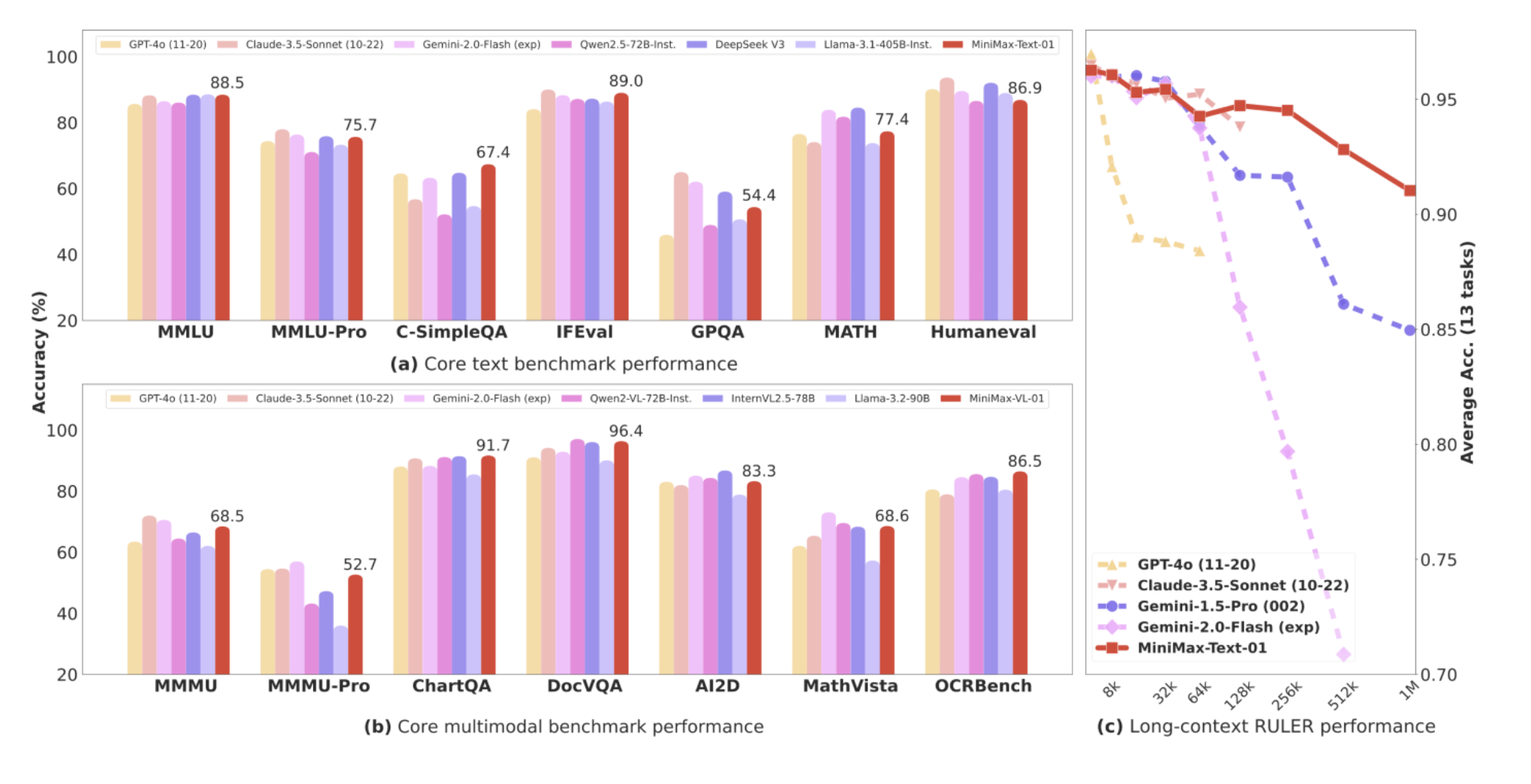
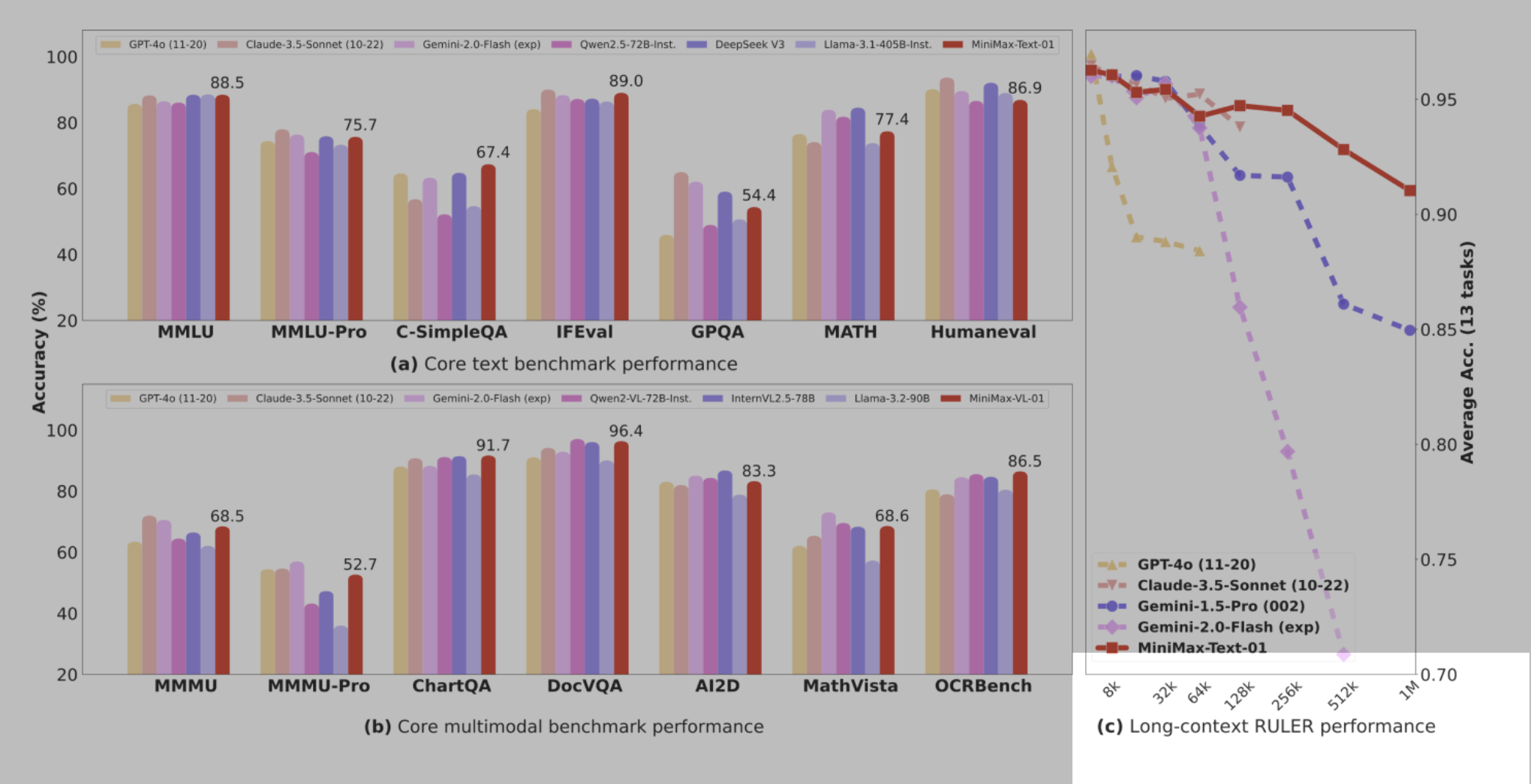
<p><img src="https://www.lightenna.com/assets/images/presentation_resources/2025-01-17/minimax-text-01-benchmarks-complete.png" alt="Graph showing the quality of AI by an array of different benchmarks" /></p>

<p>AI improving is not news.  The quality of the outputs of AI models is going to carry on improving.
It may eventually be bounded by the availability of high-quality training data, but even that is debatable.
I’m pretty sure AI is going to be valuable for organisations and individuals alike.</p>

<p><a href="https://www.minimaxi.com/en/news/minimax-01-series-2">Source: MiniMax</a></p>

<hr />

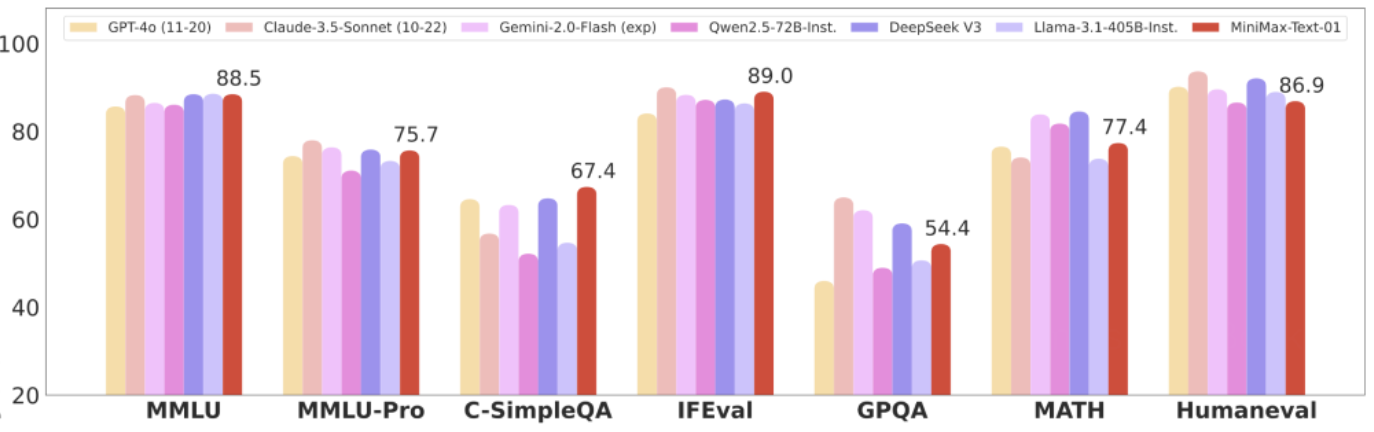
<p><img src="https://www.lightenna.com/assets/images/presentation_resources/2025-01-17/minimax-text-01-benchmarks.png" alt="Graph showing the quality of AI by an array of different benchmarks" /></p>

<hr />

<h2 id="investment">Investment</h2>

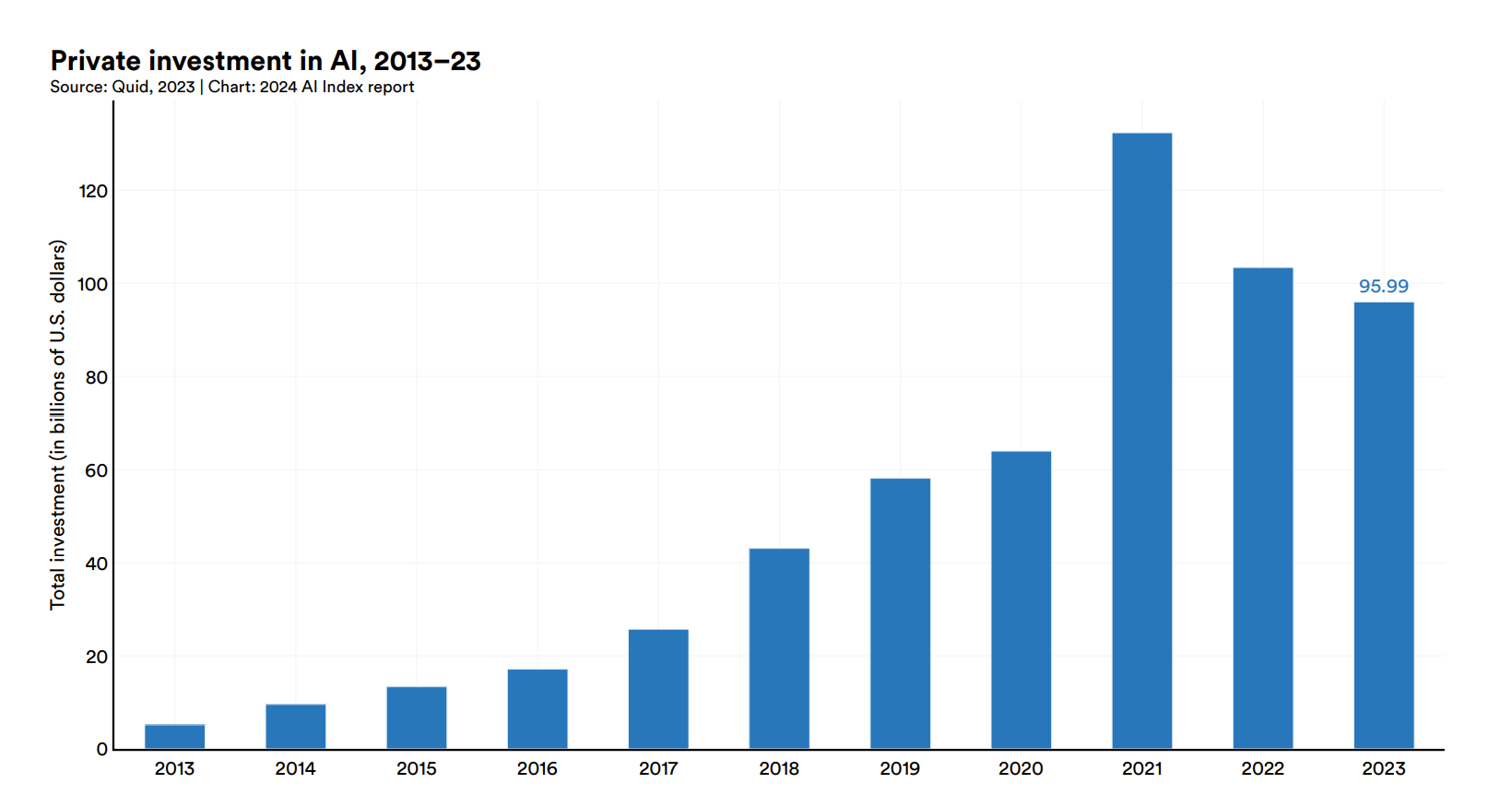
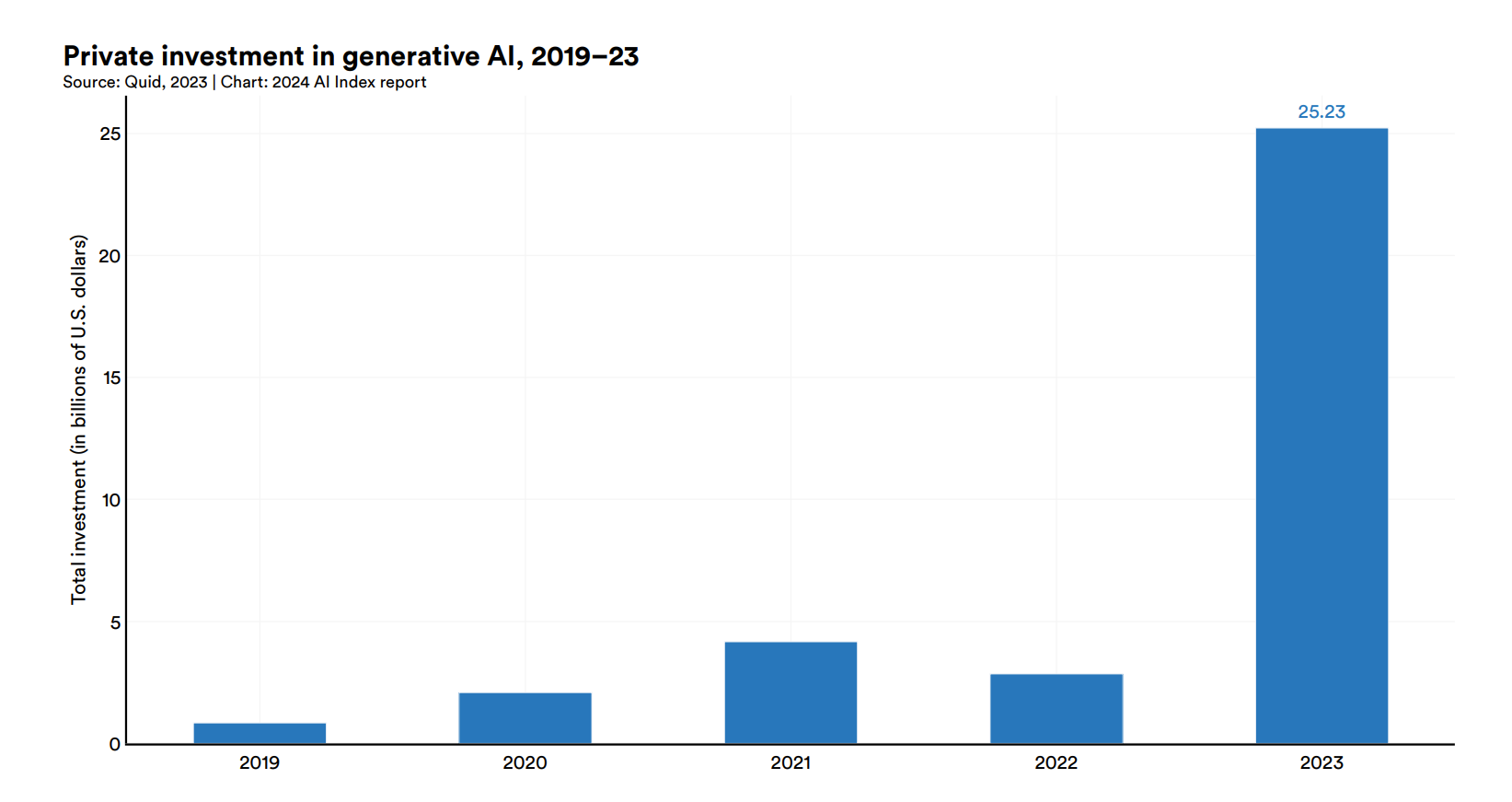
<p><img src="https://www.lightenna.com/assets/images/presentation_resources/2025-01-17/private-investment-in-AI-to-2023.png" alt="Private investment in AI" /></p>

<p>…so does most of the tech sector.  That’s why major ICT companies are investing so heavily.</p>

<p><a href="https://aiindex.stanford.edu/report/">Source: 2024 AI Index Annual report</a></p>

<hr />

<p><img src="https://www.lightenna.com/assets/images/presentation_resources/2025-01-17/private-investment-in-AI-to-2023-AI-index-report.png" alt="Private investment in AI" /></p>

<hr />

<p><img src="https://www.lightenna.com/assets/images/presentation_resources/2025-01-17/private-investment-in-generative-AI-to-2023.png" alt="Private investment in Generative AI" /></p>

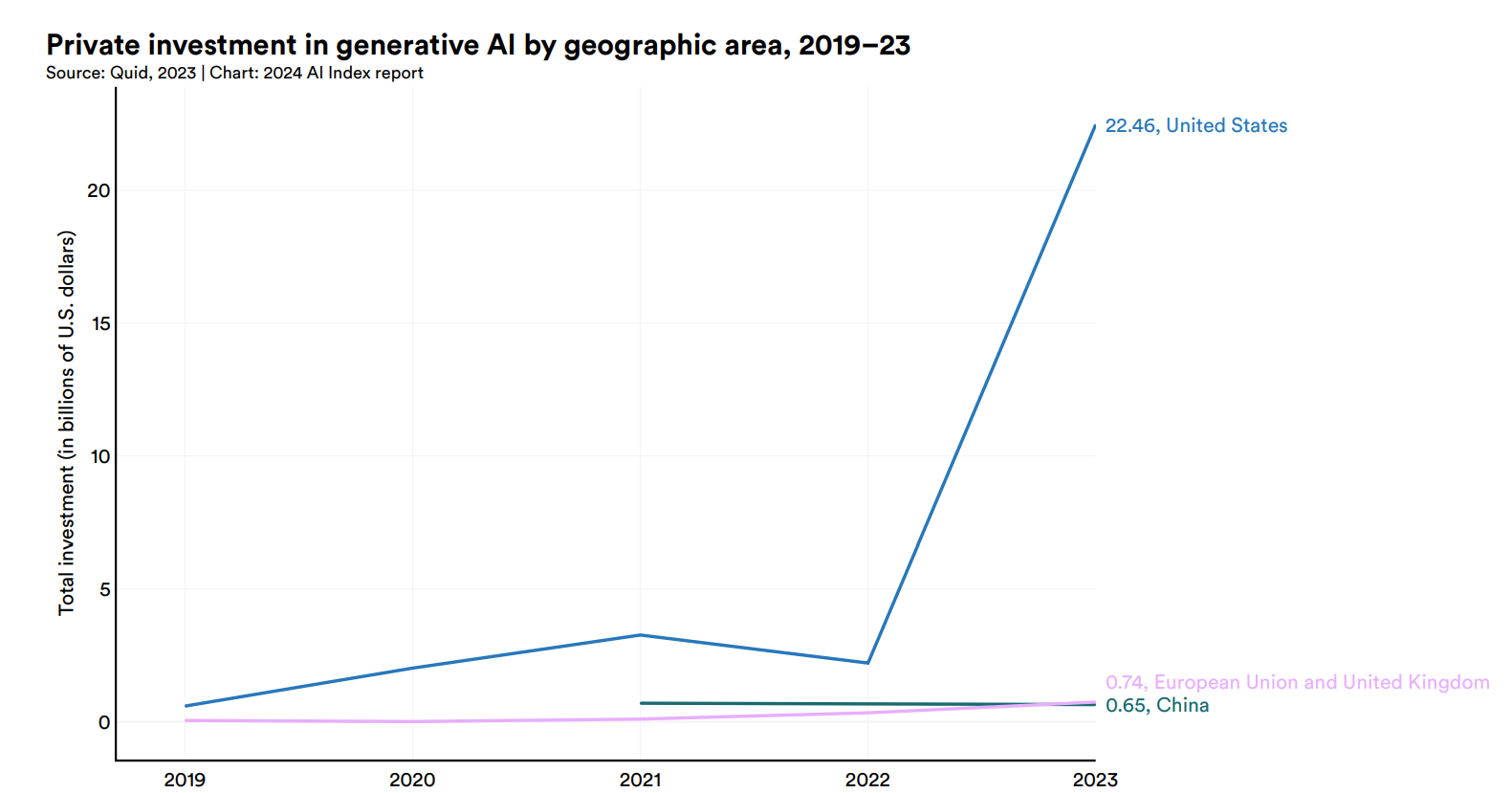
<p>Generative AI investment figures aren’t available for 2024-2025 yet, but I expect them to be higher than these 2023 figures.</p>

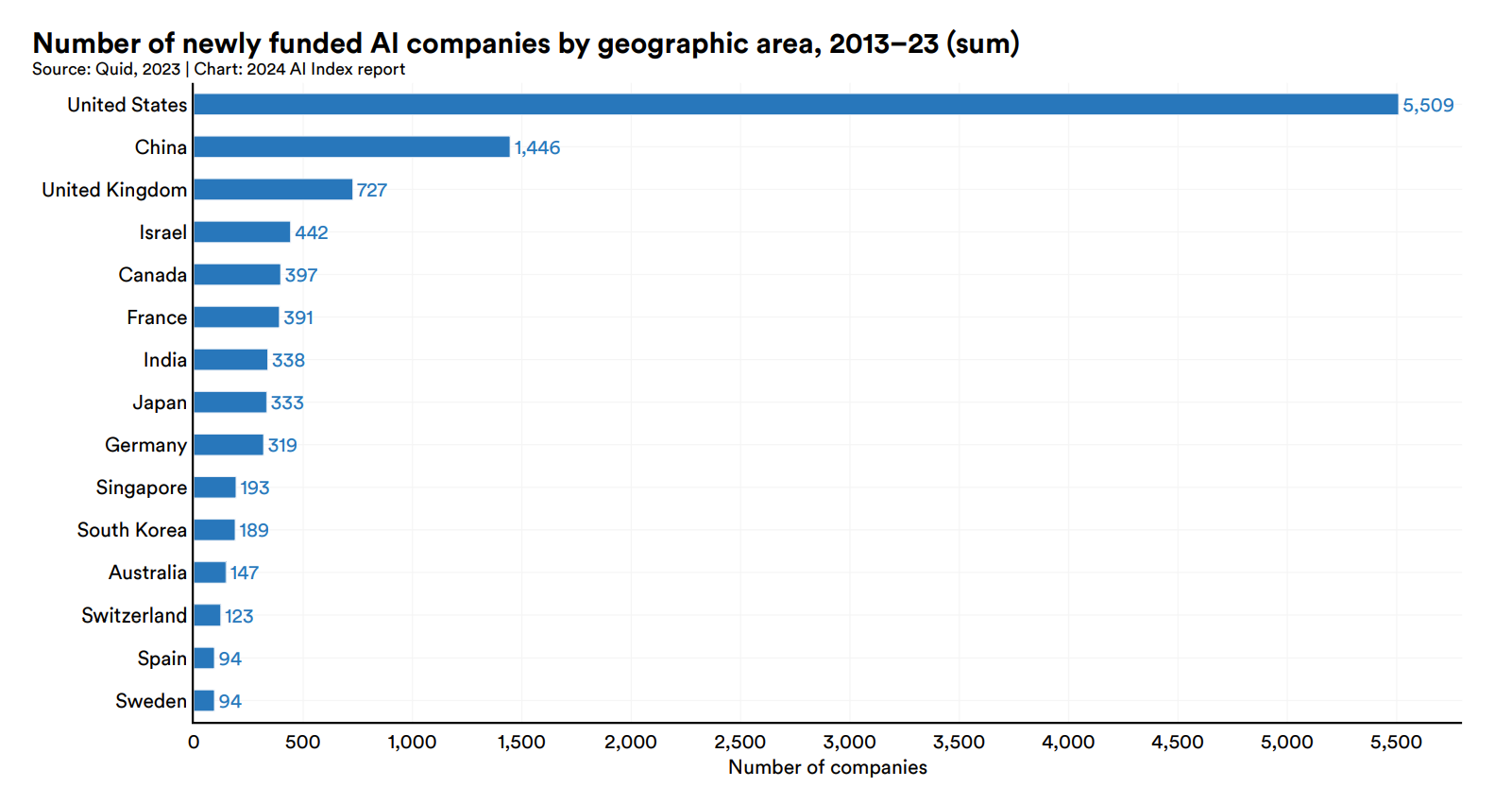
<p><img src="https://www.lightenna.com/assets/images/presentation_resources/2025-01-17/private-investment-in-generative-AI-by-region-to-2023.png" alt="Private investment in Generative AI by region" /></p>

<hr />

<h2 id="not-news">Not news</h2>
<ul>
  <li>Quality and investment trends are not surprising</li>
  <li>Growth is inevitable</li>
  <li>Not about parameter count</li>
  <li>Not about prompts</li>
</ul>

<hr />

<p><img src="https://www.lightenna.com/assets/images/presentation_resources/2025-01-17/minimax-text-01-benchmarks-complete-highlight-xaxis.png" alt="Graph showing the growth in context window size" /></p>

<hr />

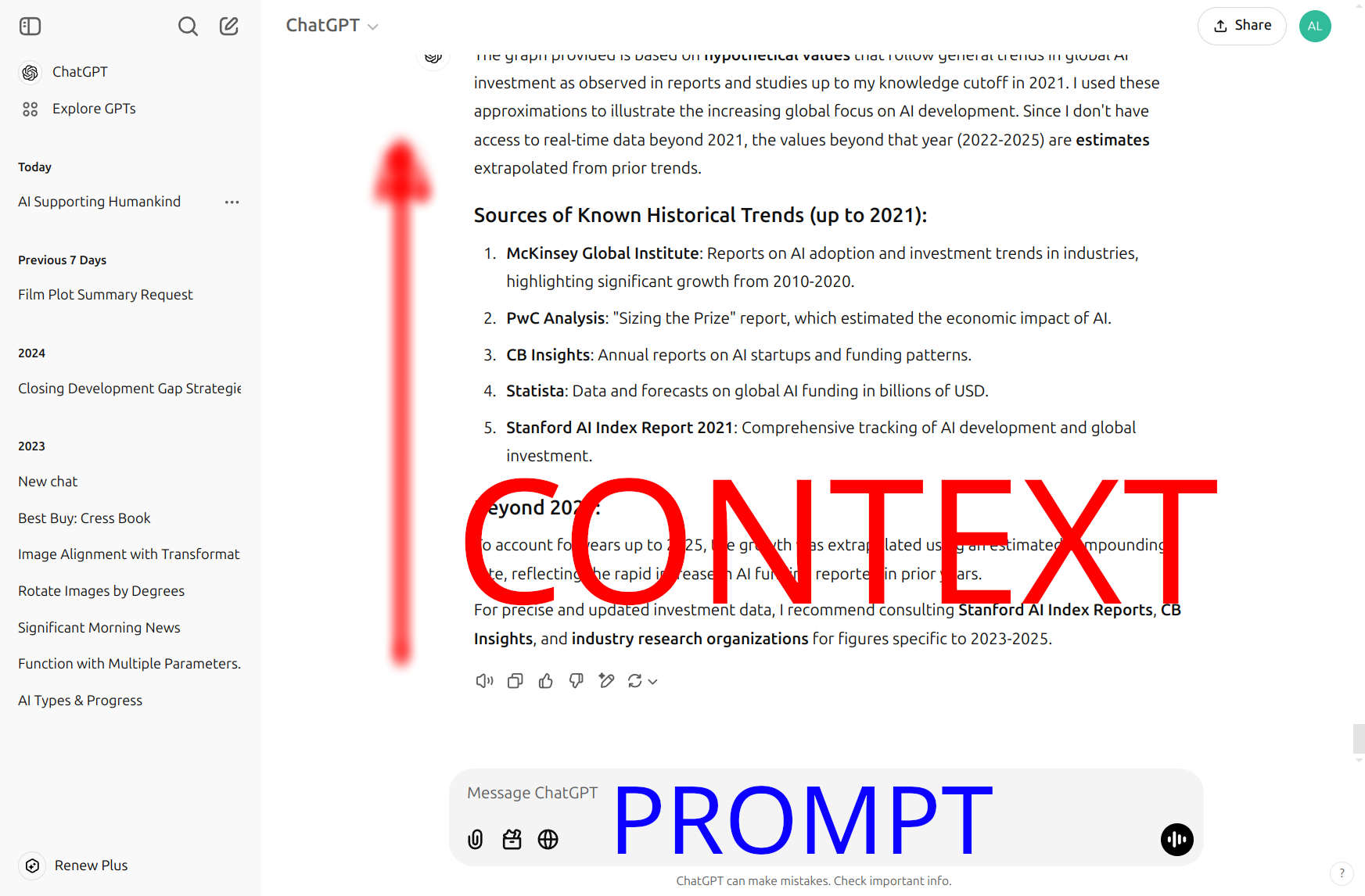
<p><img src="https://www.lightenna.com/assets/images/presentation_resources/2025-01-17/prompt-vs-context.png" alt="What context means" /></p>

<hr />

<h2 id="what-bigger-context-means">What bigger context means</h2>

<ul>
  <li>1M token window</li>
  <li>Equivalent to roughly 800,000 words
    <ul>
      <li>Shakespeare’s complete works</li>
      <li>2000 pages of text</li>
    </ul>
  </li>
</ul>

<hr />

<h2 id="issues">Issues</h2>

<p><img src="https://www.lightenna.com/assets/images/presentation_resources/2025-01-17/ruler-whats-the-real-context-size-benchmark-comparison.png" alt="Accuracy drops as context window size increases" /></p>

<p><a href="https://arxiv.org/pdf/2404.06654">Source: NVIDIA paper, What’s the Real Context Size of Your Long-Context Language Models</a></p>

<hr />

<h2 id="meaningful-improvement">Meaningful improvement</h2>

<div style="height: 450px">
![Accuracy drops as context window size increases](https://www.lightenna.com/assets/images/presentation_resources/2025-01-17/minimax-text-01-long-context.png)
</div>

<hr />

<h2 id="reaction-to-growth">Reaction to growth</h2>

<blockquote>
  <p>“I can’t emphasize enough how <strong>mind-blowing</strong> extremely long token context windows are…”</p>
</blockquote>

<p><a href="https://x.com/xiao_ted/status/1761865996716114412">Ted Xiao on X</a></p>

<hr />

<blockquote>
  <p>“For both AI researchers and practitioners, massive context windows will have transformative long-term impact, beyond one or two flashy news cycles.”</p>
</blockquote>

<hr />

<h2 id="ai-now">AI now</h2>

<ul>
  <li>AI is knowledgeable</li>
  <li>AI has near instant recall</li>
  <li>Scalable</li>
  <li>Works 24/7</li>
  <li>Not perfect, expensive, hallucinations</li>
  <li>Constantly improving</li>
</ul>

<hr />

<h2 id="2000-pages-of">2000 pages of…</h2>

<ul>
  <li>Product briefs</li>
  <li>Technical manuals</li>
  <li>EPKs</li>
  <li>Company blogs</li>
  <li>Emails</li>
  <li>Roadmaps</li>
  <li>Design documents</li>
  <li>Repositories of source code</li>
</ul>

<hr />

<h2 id="what-it-means-for-business">What it means for business</h2>

<ul>
  <li>Business-specific context</li>
  <li>Up to now, AI has been a smart new hire</li>
  <li>Long context allows AI to be a wise old-timer</li>
</ul>

<hr />

<h2 id="buy-vs-build">Buy vs build</h2>

<ul>
  <li>Can train your own models
    <ul>
      <li>but can you compete with the big players?</li>
    </ul>
  </li>
  <li>Can feed existing models with context</li>
  <li>Can feed future models with context</li>
  <li>Hype warning</li>
</ul>

<hr />

<blockquote>
  <p>“God I love AI hype.</p>
</blockquote>

<blockquote>
  <p>Pump it straight into my veins 🤤”</p>
</blockquote>

<p><a href="https://www.reddit.com/r/singularity/comments/1b05zpe/i_cant_emphasize_enough_how_mindblowing_extremely/">Different-Froyo9497</a></p>

<p>This quote comes from a <a href="https://www.reddit.com/r/singularity/comments/1b05zpe/i_cant_emphasize_enough_how_mindblowing_extremely/">Reddit post on significance</a>.</p>

<hr />

<blockquote>
  <p>“God I love AI hype.  Pump it straight into my veins <strong>and let me feel the singularity coming</strong>.”</p>
</blockquote>

<p><a href="https://docs.github.com/en/copilot/about-github-copilot/what-is-github-copilot">AI auto-correct, Github Copilot/GPT-4</a></p>

<hr />

<h2 id="challenges">Challenges</h2>

<ul>
  <li>Data quality</li>
  <li>Data quantity</li>
  <li>Relevance</li>
  <li>Semantic processing</li>
  <li>Information architecture</li>
  <li>Business process integration</li>
</ul>

<hr />

<blockquote>
  <p>“The biggest single cost in adopting AI is the one you could have paid 10 years ago.”</p>
</blockquote>

<hr />

<h2 id="help">Help</h2>

<p>If you’d like help organising and preparing your digital strategy, working with your team to foster a data-driven open culture, or just hands-on-keyboard training to embed AI in your workflows, please <a href="/contact">get in touch</a>.</p>

<p><a class="reveal-link" href="reveal/">View as a presentation</a></p>]]></content><author><name>Alex Stanhope</name></author><category term="front" /><category term="tech" /><category term="ai" /><category term="future" /><summary type="html"><![CDATA[Generating large language models is out of reach for most businesses, but it's context rather than parameter count that makes AI useful.]]></summary></entry><entry><title type="html">Positive Futures for AI - 3. Context</title><link href="https://www.lightenna.com/tech/2025/positive-futures-ai-part3-context/reveal/" rel="alternate" type="text/html" title="Positive Futures for AI - 3. Context" /><published>2025-01-20T00:00:00+00:00</published><updated>2025-01-20T00:00:00+00:00</updated><id>https://www.lightenna.com/tech/2025/positive-futures-ai-part3-context/positive-futures-ai-3-context_presentation</id><content type="html" xml:base="https://www.lightenna.com/tech/2025/positive-futures-ai-part3-context/reveal/"><![CDATA[<div class="reveal"><div class="slides"><section data-markdown="" data-separator="^\n---\n$" data-separator-vertical="^\n----\n$" data-notes="^Note:"><script type="text/template">


## Context is sovereign

> Positive Futures for AI, part 3

Note: 

This presentation is a follow-on from:
* [Part 1: Understand it](/tech/2023/positive-futures-ai-part1-understand-it/)
* [Part 2: Train](/tech/2023/positive-futures-ai-part2-train/)

---

## Quality of AI

![Graph showing the quality of AI by an array of different benchmarks](https://www.lightenna.com/assets/images/presentation_resources/2025-01-17/minimax-text-01-benchmarks-complete.png)

Note: 

AI improving is not news.  The quality of the outputs of AI models is going to carry on improving.
It may eventually be bounded by the availability of high-quality training data, but even that is debatable.
I'm pretty sure AI is going to be valuable for organisations and individuals alike.

[Source: MiniMax](https://www.minimaxi.com/en/news/minimax-01-series-2)

---

![Graph showing the quality of AI by an array of different benchmarks](https://www.lightenna.com/assets/images/presentation_resources/2025-01-17/minimax-text-01-benchmarks.png)

---

## Investment

![Private investment in AI](https://www.lightenna.com/assets/images/presentation_resources/2025-01-17/private-investment-in-AI-to-2023.png)

Note: 

...so does most of the tech sector.  That's why major ICT companies are investing so heavily.

[Source: 2024 AI Index Annual report](https://aiindex.stanford.edu/report/)

---

![Private investment in AI](https://www.lightenna.com/assets/images/presentation_resources/2025-01-17/private-investment-in-AI-to-2023-AI-index-report.png)

---

![Private investment in Generative AI](https://www.lightenna.com/assets/images/presentation_resources/2025-01-17/private-investment-in-generative-AI-to-2023.png)

Note: 

Generative AI investment figures aren't available for 2024-2025 yet, but I expect them to be higher than these 2023 figures.

![Private investment in Generative AI by region](https://www.lightenna.com/assets/images/presentation_resources/2025-01-17/private-investment-in-generative-AI-by-region-to-2023.png)

---

## Not news
+ Quality and investment trends are not surprising
+ Growth is inevitable
+ Not about parameter count
+ Not about prompts

---

![Graph showing the growth in context window size](https://www.lightenna.com/assets/images/presentation_resources/2025-01-17/minimax-text-01-benchmarks-complete-highlight-xaxis.png)

---

![What context means](https://www.lightenna.com/assets/images/presentation_resources/2025-01-17/prompt-vs-context.png)

---

## What bigger context means

+ 1M token window
+ Equivalent to roughly 800,000 words
  + Shakespeare's complete works
  + 2000 pages of text

---


## Issues

![Accuracy drops as context window size increases](https://www.lightenna.com/assets/images/presentation_resources/2025-01-17/ruler-whats-the-real-context-size-benchmark-comparison.png)

Note: 

[Source: NVIDIA paper, What's the Real Context Size of Your Long-Context Language Models](https://arxiv.org/pdf/2404.06654)

---

## Meaningful improvement

<div style="height: 450px">
![Accuracy drops as context window size increases](https://www.lightenna.com/assets/images/presentation_resources/2025-01-17/minimax-text-01-long-context.png)
</div>

---

## Reaction to growth

> "I can’t emphasize enough how **mind-blowing** extremely long token context windows are..."

[Ted Xiao on X](https://x.com/xiao_ted/status/1761865996716114412)

---

> "For both AI researchers and practitioners, massive context windows will have transformative long-term impact, beyond one or two flashy news cycles."

---

## AI now

+ AI is knowledgeable
+ AI has near instant recall
+ Scalable
+ Works 24/7
+ Not perfect, expensive, hallucinations
+ Constantly improving

---

## 2000 pages of...

+ Product briefs
+ Technical manuals
+ EPKs
+ Company blogs
+ Emails
+ Roadmaps
+ Design documents
+ Repositories of source code

---

## What it means for business

+ Business-specific context
+ Up to now, AI has been a smart new hire
+ Long context allows AI to be a wise old-timer

---

## Buy vs build

+ Can train your own models
  + but can you compete with the big players?
+ Can feed existing models with context
+ Can feed future models with context
+ Hype warning

---

> "God I love AI hype.

> Pump it straight into my veins 🤤"

[Different-Froyo9497](https://www.reddit.com/r/singularity/comments/1b05zpe/i_cant_emphasize_enough_how_mindblowing_extremely/)

Note: 

This quote comes from a [Reddit post on significance](https://www.reddit.com/r/singularity/comments/1b05zpe/i_cant_emphasize_enough_how_mindblowing_extremely/).

---

> "God I love AI hype.  Pump it straight into my veins **and let me feel the singularity coming**."

[AI auto-correct, Github Copilot/GPT-4](https://docs.github.com/en/copilot/about-github-copilot/what-is-github-copilot)

---

## Challenges

+ Data quality
+ Data quantity
+ Relevance
+ Semantic processing
+ Information architecture
+ Business process integration

---

> "The biggest single cost in adopting AI is the one you could have paid 10 years ago."

---

## Help

Note: 
If you'd like help organising and preparing your digital strategy, working with your team to foster a data-driven open culture, or just hands-on-keyboard training to embed AI in your workflows, please [get in touch](/contact).


</script></section></div></div>]]></content><author><name>Alex Stanhope</name></author><summary type="html"><![CDATA[Generating large language models is out of reach for most businesses, but it's context rather than parameter count that makes AI useful.]]></summary></entry><entry><title type="html">Cloud provisioning for container hosting</title><link href="https://www.lightenna.com/tech/2024/cloud-provisioning-for-container-hosting/" rel="alternate" type="text/html" title="Cloud provisioning for container hosting" /><published>2024-09-26T00:00:00+00:00</published><updated>2024-09-26T00:00:00+00:00</updated><id>https://www.lightenna.com/tech/2024/cloud-provisioning-for-container-hosting</id><content type="html" xml:base="https://www.lightenna.com/tech/2024/cloud-provisioning-for-container-hosting/"><![CDATA[<h2 id="cloud-provisioning">Cloud provisioning</h2>
<ul>
  <li>Goal to create infrastructure that is:
    <ul>
      <li>Managable</li>
      <li>Scalable</li>
      <li>Secure</li>
    </ul>
  </li>
  <li>Managed as code
    <ul>
      <li>Terraform</li>
      <li>AZ CLI</li>
    </ul>
  </li>
  <li>Azure examples</li>
</ul>

<p>This presentation is a follow-on from:</p>
<ul>
  <li><a href="/tech/2020/building-blocks-for-hosting-containers/">Building blocks for hosting containers</a></li>
  <li><a href="/tech/2020/put-containers-into-production-fast/">Productionising containers</a></li>
  <li><a href="/tech/2019/git-version-control-magic/">Git version control (part 1)</a></li>
  <li><a href="/tech/2020/adopt-gitflow-for-team-collaboration/">Gitflow (part 2)</a></li>
</ul>

<hr />

<h2 id="kubernetes">Kubernetes</h2>
<ul>
  <li>Container orchestration</li>
  <li>Pods and services</li>
</ul>

<hr />

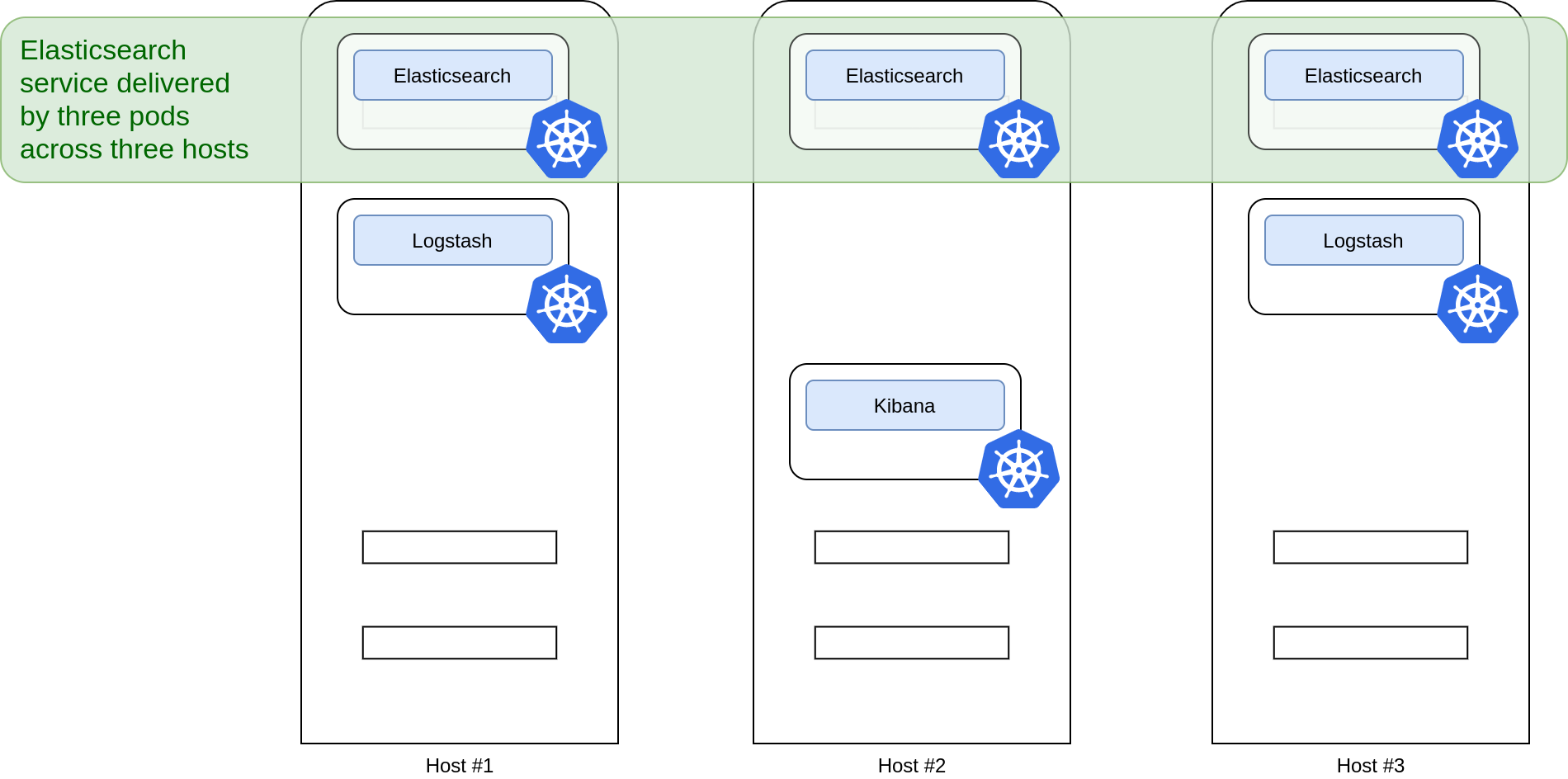
<p>Services broker requests to an orchestrated set of pods</p>
<div class="svg-embed">
  <figure class="image">
    <object class="wrapper" type="image/svg+xml" data="/assets/svg/kubernetes/k8s-service-across-pods-by-host.svg">
      
      <img src="/assets/svg/kubernetes/k8s-service-across-pods-by-host.png" alt="Falling back to PNG as your browser does not support SVG." />
      
    </object>
    
  </figure>
</div>
<div class="download-link">
  <a href="/assets/svg/kubernetes/k8s-service-across-pods-by-host.svg">Download SVG</a>
   | <a class="download-link" href="/assets/svg/kubernetes/k8s-service-across-pods-by-host.png">PNG</a>
</div>

<hr />

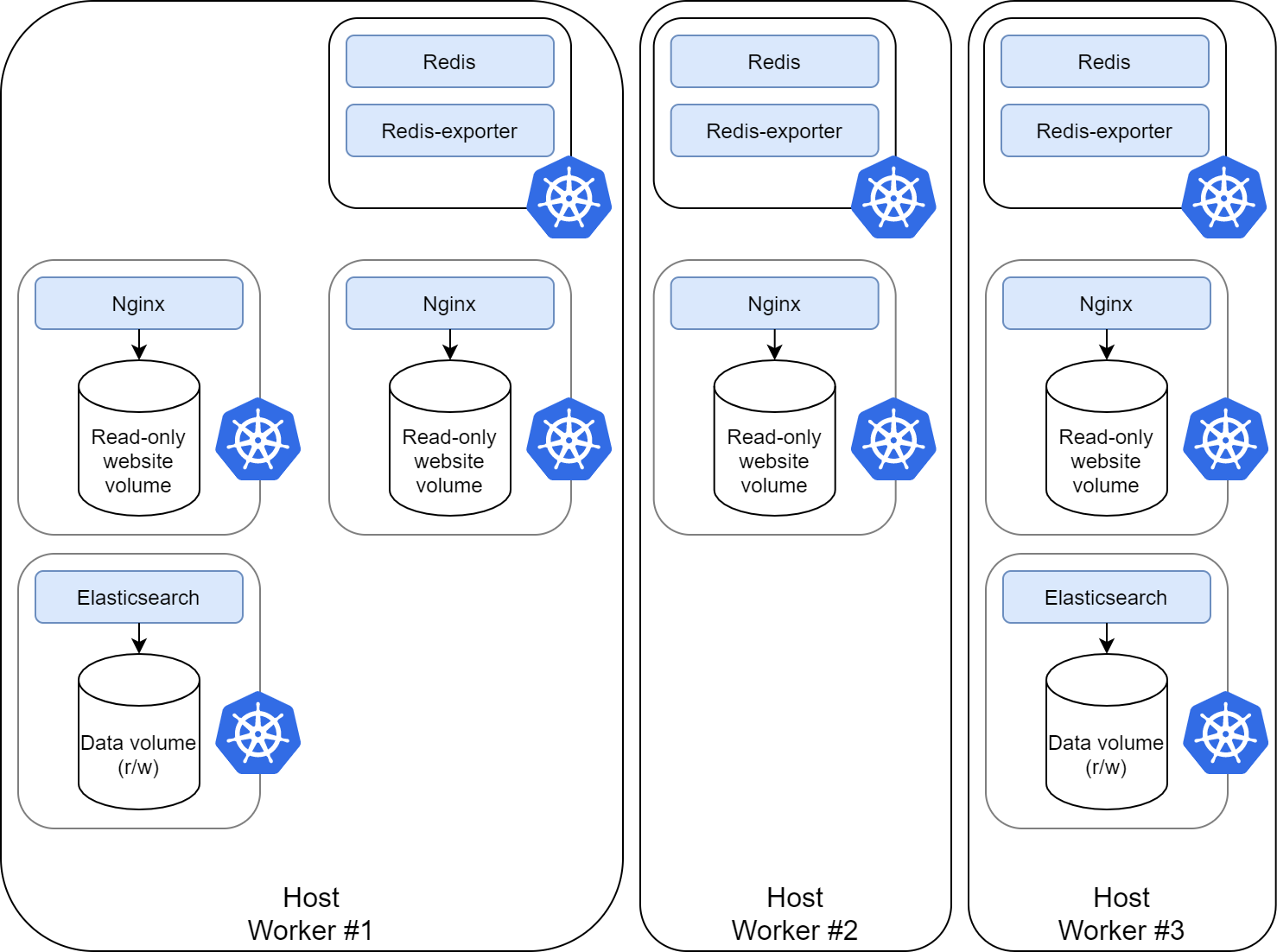
<p>Pods may be replicated across multiple worker nodes</p>
<div class="svg-embed">
  <figure class="image">
    <object class="wrapper" type="image/svg+xml" data="/assets/svg/kubernetes/k8s-service-across-workers.svg">
      
      <img src="/assets/svg/kubernetes/k8s-service-across-workers.png" alt="Falling back to PNG as your browser does not support SVG." />
      
    </object>
    
  </figure>
</div>
<div class="download-link">
  <a href="/assets/svg/kubernetes/k8s-service-across-workers.svg">Download SVG</a>
   | <a class="download-link" href="/assets/svg/kubernetes/k8s-service-across-workers.png">PNG</a>
</div>

<hr />

<h2 id="bigger-picture">Bigger picture</h2>
<ul>
  <li>Service in project context</li>
  <li>Service-specific requirements
    <ul>
      <li>Container registry</li>
      <li>Secret management</li>
      <li>Secure access (bastion hosts)</li>
      <li>Networks</li>
    </ul>
  </li>
</ul>

<hr />

<h2 id="bigger-picture-1">Bigger picture</h2>
<ul>
  <li>Service in a wider context</li>
  <li>Adjunct requirements
    <ul>
      <li>Managing Terraform state</li>
      <li>Cloud security</li>
      <li>Logging and monitoring</li>
      <li>DNS</li>
      <li>User management (Active Directory)</li>
      <li>Networks</li>
    </ul>
  </li>
</ul>

<hr />

<h2 id="bigger-picture-2">Bigger picture</h2>
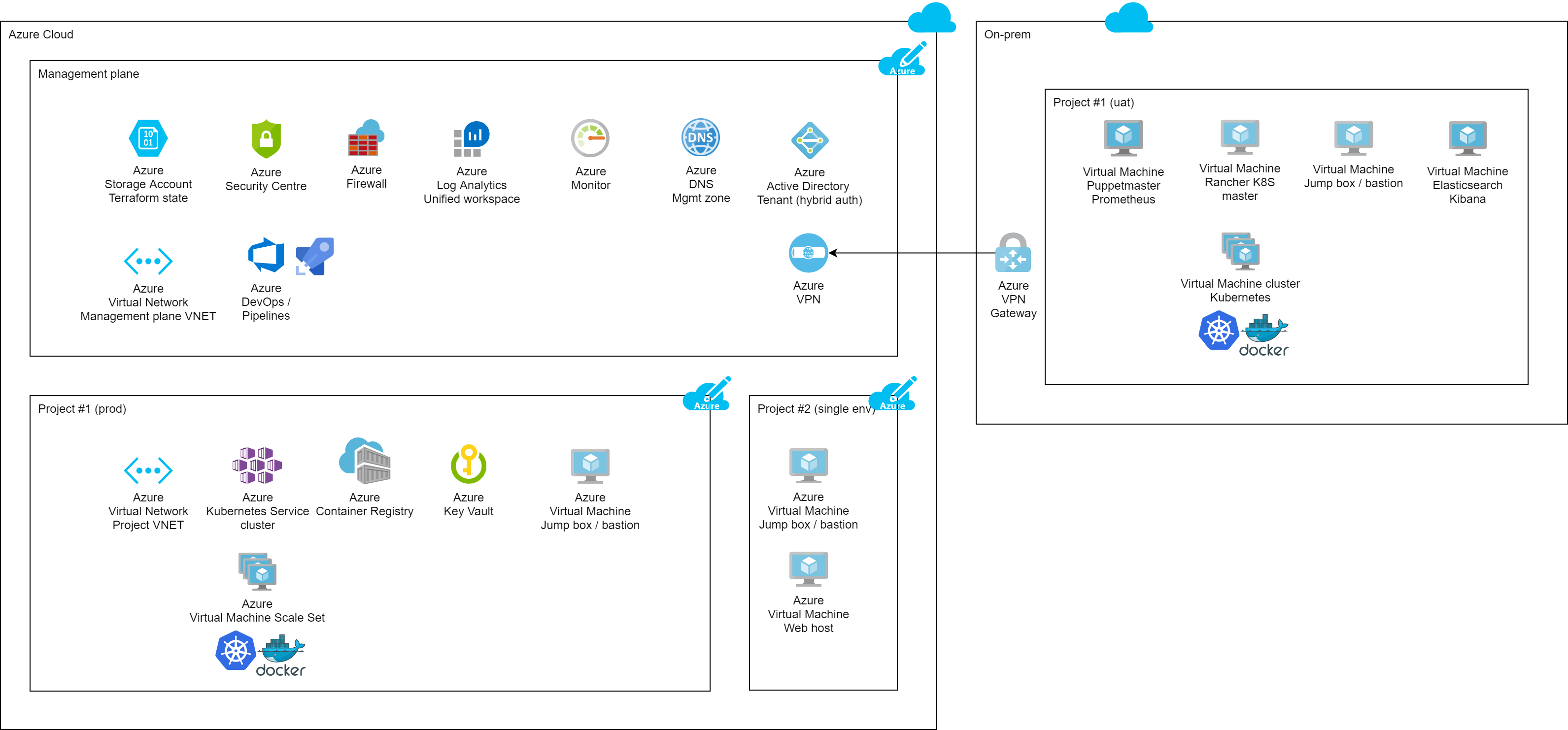
<div class="svg-embed">
  <figure class="image">
    <object class="wrapper" type="image/svg+xml" data="/assets/svg/azure-cloud-architecture2-simplified.svg">
      
      <img src="/assets/svg/azure-cloud-architecture2-simplified.png" alt="Falling back to PNG as your browser does not support SVG." />
      
    </object>
    
  </figure>
</div>
<div class="download-link">
  <a href="/assets/svg/azure-cloud-architecture2-simplified.svg">Download SVG</a>
   | <a class="download-link" href="/assets/svg/azure-cloud-architecture2-simplified.png">PNG</a>
</div>

<hr />

<h2 id="examples">Examples</h2>
<ul>
  <li>Terraform (Kubernetes)
    <ul>
      <li>Azure Kubernetes Service (AKS)</li>
    </ul>
  </li>
  <li>Terraform (App Service)
    <ul>
      <li>Azure App Service</li>
      <li>Azure Container Registry (ACR)</li>
      <li>Azure Key Vault</li>
    </ul>
  </li>
</ul>

<hr />

<h2 id="help">Help</h2>

<p>If you’d like help organising and preparing your digital strategy, working with your team to foster a data-driven open culture, or just hands-on-keyboard training in infrastructure-as-code, please <a href="/contact">get in touch</a>.</p>

<p><a class="reveal-link" href="reveal/">View as a presentation</a></p>]]></content><author><name>Alex Stanhope</name></author><category term="tech" /><category term="devops" /><summary type="html"><![CDATA[Containers are a great way to run software or deliver services, they just need hosting in such a way that they're manageable, scalable and secure]]></summary></entry><entry><title type="html">Cloud provisioning for container hosting</title><link href="https://www.lightenna.com/tech/2024/cloud-provisioning-for-container-hosting/reveal/" rel="alternate" type="text/html" title="Cloud provisioning for container hosting" /><published>2024-09-26T00:00:00+00:00</published><updated>2024-09-26T00:00:00+00:00</updated><id>https://www.lightenna.com/tech/2024/cloud-provisioning-for-container-hosting/cloud-provisioning-for-container-hosting_presentation</id><content type="html" xml:base="https://www.lightenna.com/tech/2024/cloud-provisioning-for-container-hosting/reveal/"><![CDATA[<div class="reveal"><div class="slides"><section data-markdown="" data-separator="^\n---\n$" data-separator-vertical="^\n----\n$" data-notes="^Note:"><script type="text/template">


## Cloud provisioning
+ Goal to create infrastructure that is:
  + Managable
  + Scalable
  + Secure
+ Managed as code
  + Terraform
  + AZ CLI
+ Azure examples

Note: 

This presentation is a follow-on from:
* [Building blocks for hosting containers](/tech/2020/building-blocks-for-hosting-containers/)
* [Productionising containers](/tech/2020/put-containers-into-production-fast/)
* [Git version control (part 1)](/tech/2019/git-version-control-magic/)
* [Gitflow (part 2)](/tech/2020/adopt-gitflow-for-team-collaboration/)

---

## Kubernetes
+ Container orchestration
+ Pods and services

---

Services broker requests to an orchestrated set of pods
<div class="svg-embed">
  <figure class="image" >
    <object class="wrapper" type="image/svg+xml" data="/assets/svg/kubernetes/k8s-service-across-pods-by-host.svg">
      
      <img src="/assets/svg/kubernetes/k8s-service-across-pods-by-host.png" alt="Falling back to PNG as your browser does not support SVG." />
      
    </object>
    
  </figure>
</div>
<div class="download-link">
  <a href="/assets/svg/kubernetes/k8s-service-across-pods-by-host.svg">Download SVG</a>
   | <a class="download-link" href="/assets/svg/kubernetes/k8s-service-across-pods-by-host.png">PNG</a>
</div>


---

Pods may be replicated across multiple worker nodes
<div class="svg-embed">
  <figure class="image" >
    <object class="wrapper" type="image/svg+xml" data="/assets/svg/kubernetes/k8s-service-across-workers.svg">
      
      <img src="/assets/svg/kubernetes/k8s-service-across-workers.png" alt="Falling back to PNG as your browser does not support SVG." />
      
    </object>
    
  </figure>
</div>
<div class="download-link">
  <a href="/assets/svg/kubernetes/k8s-service-across-workers.svg">Download SVG</a>
   | <a class="download-link" href="/assets/svg/kubernetes/k8s-service-across-workers.png">PNG</a>
</div>


---

## Bigger picture
+ Service in project context
+ Service-specific requirements
  + Container registry
  + Secret management
  + Secure access (bastion hosts)
  + Networks

---

## Bigger picture
+ Service in a wider context
+ Adjunct requirements
  + Managing Terraform state
  + Cloud security
  + Logging and monitoring
  + DNS
  + User management (Active Directory)
  + Networks

---

## Bigger picture
<div class="svg-embed">
  <figure class="image" >
    <object class="wrapper" type="image/svg+xml" data="/assets/svg/azure-cloud-architecture2-simplified.svg">
      
      <img src="/assets/svg/azure-cloud-architecture2-simplified.png" alt="Falling back to PNG as your browser does not support SVG." />
      
    </object>
    
  </figure>
</div>
<div class="download-link">
  <a href="/assets/svg/azure-cloud-architecture2-simplified.svg">Download SVG</a>
   | <a class="download-link" href="/assets/svg/azure-cloud-architecture2-simplified.png">PNG</a>
</div>


---

## Examples
+ Terraform (Kubernetes)
  + Azure Kubernetes Service (AKS)
+ Terraform (App Service)
  + Azure App Service
  + Azure Container Registry (ACR)
  + Azure Key Vault

---

## Help

Note: 
If you'd like help organising and preparing your digital strategy, working with your team to foster a data-driven open culture, or just hands-on-keyboard training in infrastructure-as-code, please [get in touch](/contact).


</script></section></div></div>]]></content><author><name>Alex Stanhope</name></author><summary type="html"><![CDATA[Containers are a great way to run software or deliver services, they just need hosting in such a way that they're manageable, scalable and secure]]></summary></entry><entry><title type="html">Kubernetes exercises</title><link href="https://www.lightenna.com/tech/2024/kubernetes-exercises/" rel="alternate" type="text/html" title="Kubernetes exercises" /><published>2024-09-09T00:00:00+00:00</published><updated>2024-09-09T00:00:00+00:00</updated><id>https://www.lightenna.com/tech/2024/kubernetes-exercises</id><content type="html" xml:base="https://www.lightenna.com/tech/2024/kubernetes-exercises/"><![CDATA[<h2 id="exercise-roll-out-a-simple-deployment-to-set-up-a-hosted-service">Exercise: roll out a simple deployment to set up a hosted service</h2>
<ul>
  <li>Create a <code class="language-plaintext highlighter-rouge">deployment.yaml</code> manifest
    <ul>
      <li>Deploy the <a href="https://hub.docker.com/r/paulbouwer/hello-kubernetes/">Hello Kubernetes</a> container from Docker Hub
        <ul>
          <li>Guidance on <a href="https://kubernetes.io/docs/concepts/workloads/controllers/deployment/">authoring deployment manifests</a></li>
        </ul>
      </li>
      <li>Label the pods
        <ul>
          <li>In your spec.template for the deployment you can attach an app label:
            <div class="language-plaintext highlighter-rouge"><div class="highlight"><pre class="highlight"><code>metadata:
  labels:
  app: my-kubernetes-app
</code></pre></div>            </div>
          </li>
        </ul>
      </li>
      <li>Run the deployment using <code class="language-plaintext highlighter-rouge">kubectl</code>
        <ul>
          <li><code class="language-plaintext highlighter-rouge">kubectl apply -f deployment.yaml</code></li>
        </ul>
      </li>
      <li>Verify the pods have been deployed successfully
        <ul>
          <li><code class="language-plaintext highlighter-rouge">kubectl get pods</code></li>
          <li><code class="language-plaintext highlighter-rouge">kubectl get deployments</code></li>
        </ul>
      </li>
    </ul>
  </li>
  <li>Create a <code class="language-plaintext highlighter-rouge">service.yaml</code> manifest to deploy the service
    <ul>
      <li>Guidance on <a href="https://kubernetes.io/docs/concepts/services-networking/service/">authoring service manifests</a></li>
      <li>Use the label from earlier to identify the pods that compose your service.
        <ul>
          <li>In your spec.selector you can refer to the label you created earlier:
            <div class="language-plaintext highlighter-rouge"><div class="highlight"><pre class="highlight"><code>  app: my-kubernetes-app
</code></pre></div>            </div>
          </li>
        </ul>
      </li>
    </ul>
  </li>
  <li>Test the service using a web browser.</li>
</ul>

<p>This exercise builds on many of the previous labs for <a href="/tech/2021/docker-exercises/">Docker</a> and Terraform, parts <a href="/tech/2019/terraform-language-exercises/">1</a>, <a href="/tech/2020/terraform-azure-exercises/">2</a> and <a href="/tech/2021/terraform-integration-exercises/">3</a>.
If you’re attempting these exercises without completing the previous labs, you might need to use this <a href="https://github.com/lightenna/devops-workstream/tree/master/terraform/tutorial/13-azure-simple-aks">Terraform Azure AKS solution</a> to build a Kubernetes cluster to experiment on.</p>

<p>The solution to the ‘Kubernetes deployment and service’ exercise is available as a <a href="https://github.com/lightenna/devops-workstream/tree/master/kubernetes/tutorial/01-service-deployment">kubectl/YAML solution</a> as part of our open-source <a href="https://github.com/lightenna/devops-workstream/">Devops-Workstream</a>.</p>

<hr />]]></content><author><name>Alex Stanhope</name></author><category term="tech" /><category term="devops" /><category term="kubernetes" /><summary type="html"><![CDATA[Create a simple hosted service using Kubernetes and kubectl]]></summary></entry><entry><title type="html">How to use Markdown for future-proof publishing</title><link href="https://www.lightenna.com/tech/2024/write-markdown-for-future-proof-publishing/" rel="alternate" type="text/html" title="How to use Markdown for future-proof publishing" /><published>2024-08-12T00:00:00+00:00</published><updated>2024-08-12T00:00:00+00:00</updated><id>https://www.lightenna.com/tech/2024/write-markdown-for-future-proof-publishing</id><content type="html" xml:base="https://www.lightenna.com/tech/2024/write-markdown-for-future-proof-publishing/"><![CDATA[<p>Markdown brings simple ASCII text to life with formatting and structure traditionally found in rich text or Word documents.  It’s also nothing more than annotated text, which makes it accessible now and in the future.</p>

<h2 id="basic-syntax">Basic syntax</h2>
<ul>
  <li>Based on text</li>
  <li>Headings</li>
  <li>Bold, italic, strike-through</li>
  <li>Nested lists</li>
  <li>Links</li>
</ul>

<p>Markdown is designed to annotate text in a simple way that is both human-readable and machine-readable.
It’s not complicated.  Total knowledge of it is not required to get started.
In fact, with zero knowledge of markdown, you can still write a document that is readable and useful, albeit with basic formatting.</p>

<p>The internet is full of <a href="https://www.markdownguide.org/basic-syntax/">excellent markdown primers</a> or for something more comprehensive <a href="https://github.github.com/gfm/">GitHub’s GFM spec</a>.</p>

<hr />

<h2 id="simple-examples">Simple examples</h2>

<div class="language-plaintext highlighter-rouge"><div class="highlight"><pre class="highlight"><code># Heading

## Sub-heading

* List item
  * Nested list item

Paragraph with some **bold** and *italic* text.
</code></pre></div></div>

<hr />

<h2 id="internal-publishing">Internal publishing</h2>
<ul>
  <li>Documentation near the code</li>
  <li>Version control</li>
  <li>Use of markdown internally
    <ul>
      <li>and more widely</li>
    </ul>
  </li>
  <li>Create a visibility culture</li>
</ul>

<p>Markdown is a great tool for publishing documentation for an internal audience, or more widely.
It’s highly searchable, readily enriched or reformatted.
It also lends itself to version control because additions and removals are easily tracked by line.
For those working on or near projects that are already stored in repositories (repos for short), Markdown is a great mechanism for annotating or explaining it.
It can provide the high-level view, or 10,000ft summary, that’s hard to extract quickly from code alone.</p>

<p>Because all updates are versioned, it also makes it easy to keep pace with recent updates.
By looking at a diff between now and when you last looked at a project, you can quickly see what’s changed.
If the documentation has been kept up to date with the code, those docs will reflect what’s been updated in a project.
Organisations can use this combination of Markdown and version control to build a culture of visibility,
where staff collaborate to share what they’re working on, and what they’ve learned.</p>

<p>As a simple text mark-up tool, Markdown is increasingly used in many different contexts, so investment in learning and disseminating the skills is worthwhile.
For example, Markdown can be used natively in Azure DevOps, GitHub, GitLab, JIRA, Confluence, and many other tools.
It’s even the basis for chat in Microsoft Teams and Slack.</p>

<hr />

<h2 id="for-posterity">For posterity</h2>

<ul>
  <li>Separated content from display</li>
  <li>Minimal formatting
    <ul>
      <li>titles</li>
      <li>paragraphs</li>
      <li>lists</li>
      <li>emphasis</li>
      <li>nesting</li>
    </ul>
  </li>
</ul>

<p>Markdown is pure text.  There’s a minimal amount of formatting information, really only enough to inform how different sections of the document relate to each other.</p>

<p>Nested headings allow different areas of the document to subsume others.</p>

<p>This presentation illustrates the approach.  It’s available as both a web page (blog post) or a presentation (slide deck).
The markdown content that underpins it is identical for both.
This allows you to author once and use the information in multiple contexts, such as:</p>

<ul>
  <li>Background information for AI prompts</li>
  <li>Introductory material for a training course</li>
  <li>Marketing material for a product launch</li>
  <li>Documentation for a software project</li>
  <li>A blog post for community engagement</li>
  <li>A contribution to a network of interconnected, searchable web pages to aid research.</li>
</ul>

<p>While every group will have its own specific requirements, the basic structure of the document can be the same, itself included or referenced in other documents.</p>

<hr />

<h2 id="github-readmemd-and-other-files">GitHub README.md and other files</h2>
<ul>
  <li>File hierarchy</li>
  <li>The role of README files</li>
  <li>Working copies
    <ul>
      <li>in multiple contexts</li>
    </ul>
  </li>
  <li>Relative paths</li>
</ul>

<p>At the root of the repository, the README.md file is the first thing that GitHub will display.
By convention, this is where high-level information about the project sits.</p>

<p>The project’s repository could be checked out into a working copy in multiple situations:</p>
<ul>
  <li>a software engineer might checkout a working copy to update the code</li>
  <li>an automated test suite might checkout a working copy to run multiple tests against a specific configuration</li>
  <li>a devops engineer might checkout a working copy as part of the build process for a read-only container image</li>
</ul>

<p>In all these situations, the full path or URL to the working copy’s files could be different:</p>
<ul>
  <li>C:\Users\alex\Documents\GitHub\my-repo</li>
  <li>/home/alex/repos/git/github.com/my-repo</li>
  <li>/etc/puppetlabs/puppet/environments/production/my-repo</li>
  <li>https://www.example.com/open_filesets/my-repo</li>
</ul>

<p>The goal when creating references is to do so in such a way that they are always accessible.</p>

<p>A link can point at anything but by using relative paths (relative to the current file),
links can be made resilient to the many different locations this repo will be checked out.</p>

<div class="language-plaintext highlighter-rouge"><div class="highlight"><pre class="highlight"><code>[Link to another file](./another-file.md)
</code></pre></div></div>

<hr />

<h2 id="git-commit-and-push">Git commit and push</h2>
<ul>
  <li>Create branch from source</li>
  <li>Repeatedly update it
    <ul>
      <li>Commit changes to branch</li>
      <li>Push branch</li>
    </ul>
  </li>
  <li>Merge changes back into source
    <ul>
      <li>Direct
        <ul>
          <li>Push access</li>
        </ul>
      </li>
      <li>Indirect
        <ul>
          <li>Pull requests</li>
          <li>Approvals</li>
        </ul>
      </li>
    </ul>
  </li>
</ul>

<p>This isn’t a git tutorial as such, so please see our <a href="https://www.lightenna.com/tech/git/">Git series</a> for the fundamentals.</p>

<p>The goal is to make code repos updatable by lots of users simultaneously.
Everything I’m advocating for here is designed to serve that end.
The key is to make sure that the code is always in a state that can be built and run.
That tends to be less of an issue when publishing documentation, notes or summaries alongside the code, but the principle still applies.</p>

<p>The best way to achieve that is to:</p>
<ul>
  <li>Identify a source branch
    <ul>
      <li>This varies by organisation, but often we branch</li>
    </ul>
  </li>
  <li>Branch from the right source branch
    <ul>
      <li>This is crucial, because we’ll ultimately want to merge back into the same branch.</li>
      <li>Merging back (accidentally) into a different source branch could bring with it unintended changes.</li>
      <li>The branch we create is generally known as the <code class="language-plaintext highlighter-rouge">topic</code> or <code class="language-plaintext highlighter-rouge">feature</code> branch.</li>
    </ul>
  </li>
  <li>Make a load of changes
    <ul>
      <li>This is the rinse and repeat stage.</li>
      <li>It results in multiple changes, in multiple commits on the feature branch.</li>
    </ul>
  </li>
  <li>Squash merge
    <ul>
      <li>This is where we take all the changes we made and merge them back into the source branch.</li>
      <li>Generally we want to leave behind a single commit with all our changes, hence the squash merge,
        <ul>
          <li>but it’s totally acceptable to just do a merge commit that sends all of our commits back to the source branch if that’s the desired behaviour.</li>
        </ul>
      </li>
    </ul>
  </li>
</ul>

<p>Sometimes organisations implement a more formal approval process.
The changes still go back to the source branch, but indirectly via a pull request.
In this an ‘approver’ will look over the changes before they are merged back into the source branch.
Authoring a pull request is much like authoring a commit, but it’s just a bit more formal and facilitates an approval step, which is handy for information governance.</p>

<hr />

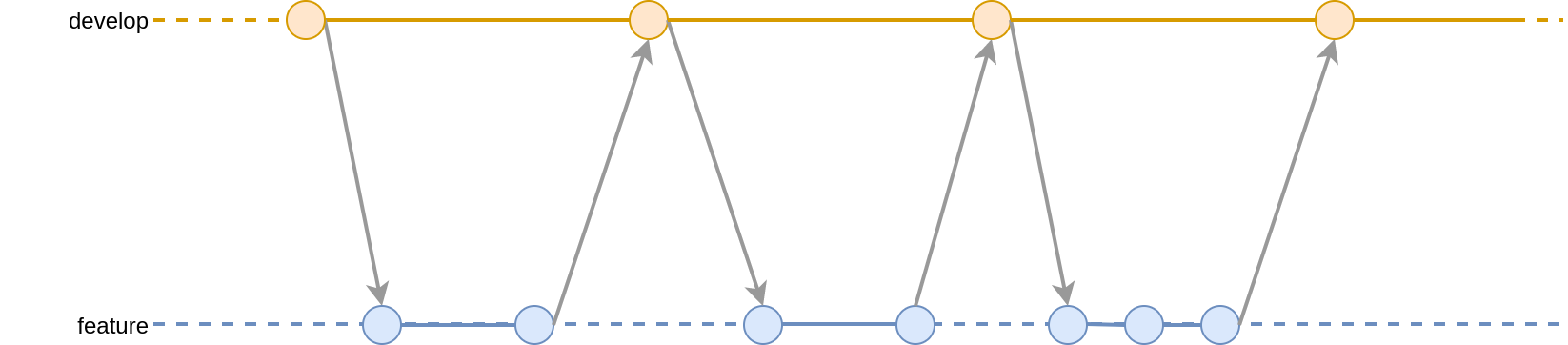
<h2 id="feature-branching">Feature branching</h2>

<div class="svg-embed">
  <figure class="image">
    <object class="wrapper" type="image/svg+xml" data="/assets/svg/gitflow/gitflow-partials-1.svg">
      
      <img src="/assets/svg/gitflow/gitflow-partials-1.png" alt="Falling back to PNG as your browser does not support SVG." />
      
    </object>
    
  </figure>
</div>
<div class="download-link">
  <a href="/assets/svg/gitflow/gitflow-partials-1.svg">Download SVG</a>
   | <a class="download-link" href="/assets/svg/gitflow/gitflow-partials-1.png">PNG</a>
</div>

<p>This diagram illustrates how a topic branch (‘feature’) might be branched from a source branch (‘develop’).
It also shows how the merge process works.
Merging could be implemented here directly, or indirectly via approved pull requests.</p>

<hr />

<h2 id="github-pages">GitHub pages</h2>
<ul>
  <li>In addition to repo view</li>
  <li>github.io or custom domain</li>
  <li>Rendered using Jekyll
    <ul>
      <li>Static site generator</li>
      <li>Theming</li>
    </ul>
  </li>
  <li>Internal or external views
    <ul>
      <li>Folder and branch linked
        <ul>
          <li>Approvals again</li>
        </ul>
      </li>
    </ul>
  </li>
</ul>

<p>GitHub Pages uses Jekyll, a static site generator, to turn Markdown files into a website.
That site could be made available publicly or privately,
such that only those users who can read the repository can view the website.
This works well for enterprise customers who might want to make intranet sites available only within the organisation.
They can be published on a custom domain, after verification by GitHub, or on a subdomain of github.io.</p>

<p>To revisit the <em>Approvals</em> discussion early, this means that the approval of a pull request can be used effectively to publish new content to the website.</p>

<p>So why publish a website based on Markdown sourced from GitHub over another CMS?
The answer is about lowering the technological barriers that impede, rather than prevent users from updating the website.
Many if not most companies have had content-managed websites since the mid 90s, yet surprisingly most company websites aren’t frequently updated.
Often the hassle, or perceived hassle of accessing and updating the CMS means that sites don’t get updated.</p>

<p>Git-based publishing works well in situations where the content is naturally linked with the repo.
If the repo coordinates all activity for a project, then there may be a wider audience interested in that project, beyond those actively driving it forward.
These stakeholders might be interested in newly released features, known issues, upcoming changes or progress against plans.
GitHub Pages enables that wider audience to get a view that’s bang-up-to-date, straight from the people working on it, right where they’re working on it.</p>

<hr />

<h2 id="publishing-demo">Publishing demo</h2>
<ul>
  <li>Simple publish process</li>
  <li>Branded front-end</li>
  <li>Multiple formats</li>
</ul>

<p>When this presentation is published, it will be available at lightenna.github.io, which is aliased to <a href="https://www.lightenna.com/">lightenna.com</a>.</p>

<p>It’s available in multiple formats:</p>

<ul>
  <li><a href="https://www.lightenna.com/tech/2024/write-markdown-for-future-proof-publishing/">Web page</a></li>
  <li><a href="https://www.lightenna.com/tech/2024/write-markdown-for-future-proof-publishing/reveal/">Presentation deck</a></li>
  <li><a href="https://raw.githubusercontent.com/cleverlight/lightenna/main/_includes/presentations/2024-08-12-write-markdown-for-future-proof-publishing.md">Raw text</a></li>
  <li><a href="https://github.com/cleverlight/lightenna/blob/main/_includes/presentations/2024-08-12-write-markdown-for-future-proof-publishing.md">Pre-formatted markdown</a></li>
</ul>

<hr />

<h2 id="contributors">Contributors</h2>
<ul>
  <li>Internal or external
    <ul>
      <li>could be
        <ul>
          <li>vendor</li>
          <li>reviewer</li>
          <li>regulator</li>
          <li>customer</li>
          <li>other</li>
        </ul>
      </li>
    </ul>
  </li>
  <li>Access control
    <ul>
      <li>approval process</li>
    </ul>
  </li>
  <li>Fit with single sign-on (SSO)</li>
</ul>

<hr />

<h2 id="alternative-platforms">Alternative platforms</h2>
<ul>
  <li>GitHub Pages is not a full CMS
    <ul>
      <li>there are restrictions</li>
      <li>but most can be liberated by plugins/configuration</li>
    </ul>
  </li>
  <li>Confluence
    <ul>
      <li>excellent publishing platform</li>
      <li>proprietary database</li>
      <li>no code-level/repo-level management
        <ul>
          <li>web browser/app access only</li>
        </ul>
      </li>
    </ul>
  </li>
</ul>

<p>Markdown, Git, Jekyll and GitHub Pages are a powerful set of tools.
I find it incredible how applicable they are to many and varied scenarios.
However they’re not a panacea.
The key differentiator for choosing a repo-based stack is when the repo is the source of activity for a project
and the project has a wider audience than those working on it.
It’s not a comprehensive replacement for Confluence or JIRA, but it can be used an excellent low-cost alternative.</p>

<hr />

<h2 id="help">Help</h2>

<p>If you’d like help organising and preparing your digital strategy, working with your team to foster a data-driven open culture, or just hands-on-keyboard training in infrastructure-as-code, please <a href="/contact">get in touch</a>.</p>

<p><a class="reveal-link" href="reveal/">View as a presentation</a></p>]]></content><author><name>Alex Stanhope</name></author><category term="tech" /><category term="devops" /><category term="markdown" /><category term="front" /><summary type="html"><![CDATA[Simple text-based structures allow you to write once, publish everywhere, and in such a way it will still be editable in 10 years]]></summary></entry><entry><title type="html">How to use Markdown for future-proof publishing</title><link href="https://www.lightenna.com/tech/2024/write-markdown-for-future-proof-publishing/reveal/" rel="alternate" type="text/html" title="How to use Markdown for future-proof publishing" /><published>2024-08-12T00:00:00+00:00</published><updated>2024-08-12T00:00:00+00:00</updated><id>https://www.lightenna.com/tech/2024/write-markdown-for-future-proof-publishing/write-markdown-for-future-proof-publishing_presentation</id><content type="html" xml:base="https://www.lightenna.com/tech/2024/write-markdown-for-future-proof-publishing/reveal/"><![CDATA[<div class="reveal"><div class="slides"><section data-markdown="" data-separator="^\n---\n$" data-separator-vertical="^\n----\n$" data-notes="^Note:"><script type="text/template">


## Basic syntax
+ Based on text
+ Headings
+ Bold, italic, strike-through
+ Nested lists
+ Links

Note: 
Markdown is designed to annotate text in a simple way that is both human-readable and machine-readable.
It's not complicated.  Total knowledge of it is not required to get started.
In fact, with zero knowledge of markdown, you can still write a document that is readable and useful, albeit with basic formatting.

The internet is full of [excellent markdown primers](https://www.markdownguide.org/basic-syntax/) or for something more comprehensive [GitHub's GFM spec](https://github.github.com/gfm/).

---

## Simple examples

```
# Heading

## Sub-heading

* List item
  * Nested list item

Paragraph with some **bold** and *italic* text.
```

---

## Internal publishing
+ Documentation near the code
+ Version control
+ Use of markdown internally
  + and more widely
+ Create a visibility culture

Note: 
Markdown is a great tool for publishing documentation for an internal audience, or more widely.
It's highly searchable, readily enriched or reformatted.
It also lends itself to version control because additions and removals are easily tracked by line.
For those working on or near projects that are already stored in repositories (repos for short), Markdown is a great mechanism for annotating or explaining it.
It can provide the high-level view, or 10,000ft summary, that's hard to extract quickly from code alone.

Because all updates are versioned, it also makes it easy to keep pace with recent updates.
By looking at a diff between now and when you last looked at a project, you can quickly see what's changed.
If the documentation has been kept up to date with the code, those docs will reflect what's been updated in a project.
Organisations can use this combination of Markdown and version control to build a culture of visibility,
where staff collaborate to share what they're working on, and what they've learned.

As a simple text mark-up tool, Markdown is increasingly used in many different contexts, so investment in learning and disseminating the skills is worthwhile.
For example, Markdown can be used natively in Azure DevOps, GitHub, GitLab, JIRA, Confluence, and many other tools.
It's even the basis for chat in Microsoft Teams and Slack.

---

## For posterity

+ Separated content from display
+ Minimal formatting
  + titles
  + paragraphs
  + lists
  + emphasis
  + nesting

Note: 
Markdown is pure text.  There's a minimal amount of formatting information, really only enough to inform how different sections of the document relate to each other.

Nested headings allow different areas of the document to subsume others.

This presentation illustrates the approach.  It's available as both a web page (blog post) or a presentation (slide deck).
The markdown content that underpins it is identical for both.
This allows you to author once and use the information in multiple contexts, such as:

* Background information for AI prompts
* Introductory material for a training course
* Marketing material for a product launch
* Documentation for a software project
* A blog post for community engagement
* A contribution to a network of interconnected, searchable web pages to aid research.

While every group will have its own specific requirements, the basic structure of the document can be the same, itself included or referenced in other documents.

---

## GitHub README.md and other files
+ File hierarchy
+ The role of README files
+ Working copies
  + in multiple contexts
+ Relative paths

Note: 
At the root of the repository, the README.md file is the first thing that GitHub will display.
By convention, this is where high-level information about the project sits.

The project's repository could be checked out into a working copy in multiple situations:
* a software engineer might checkout a working copy to update the code
* an automated test suite might checkout a working copy to run multiple tests against a specific configuration
* a devops engineer might checkout a working copy as part of the build process for a read-only container image

In all these situations, the full path or URL to the working copy's files could be different:
* C:\Users\alex\Documents\GitHub\my-repo
* /home/alex/repos/git/github.com/my-repo
* /etc/puppetlabs/puppet/environments/production/my-repo
* https://www.example.com/open_filesets/my-repo

The goal when creating references is to do so in such a way that they are always accessible.

A link can point at anything but by using relative paths (relative to the current file),
links can be made resilient to the many different locations this repo will be checked out.

```
[Link to another file](./another-file.md)
```

---

## Git commit and push
+ Create branch from source
+ Repeatedly update it
  + Commit changes to branch
  + Push branch
+ Merge changes back into source
  + Direct
    + Push access
  + Indirect
    + Pull requests
    + Approvals

Note: 
This isn't a git tutorial as such, so please see our [Git series](https://www.lightenna.com/tech/git/) for the fundamentals.

The goal is to make code repos updatable by lots of users simultaneously.
Everything I'm advocating for here is designed to serve that end.
The key is to make sure that the code is always in a state that can be built and run.
That tends to be less of an issue when publishing documentation, notes or summaries alongside the code, but the principle still applies.

The best way to achieve that is to:
* Identify a source branch
  * This varies by organisation, but often we branch
* Branch from the right source branch
  * This is crucial, because we'll ultimately want to merge back into the same branch.
  * Merging back (accidentally) into a different source branch could bring with it unintended changes.
  * The branch we create is generally known as the `topic` or `feature` branch.
* Make a load of changes
  * This is the rinse and repeat stage.
  * It results in multiple changes, in multiple commits on the feature branch.
* Squash merge
  * This is where we take all the changes we made and merge them back into the source branch.
  * Generally we want to leave behind a single commit with all our changes, hence the squash merge,
    * but it's totally acceptable to just do a merge commit that sends all of our commits back to the source branch if that's the desired behaviour.

Sometimes organisations implement a more formal approval process.
The changes still go back to the source branch, but indirectly via a pull request.
In this an 'approver' will look over the changes before they are merged back into the source branch.
Authoring a pull request is much like authoring a commit, but it's just a bit more formal and facilitates an approval step, which is handy for information governance.

---

## Feature branching

<div class="svg-embed">
  <figure class="image" >
    <object class="wrapper" type="image/svg+xml" data="/assets/svg/gitflow/gitflow-partials-1.svg">
      
      <img src="/assets/svg/gitflow/gitflow-partials-1.png" alt="Falling back to PNG as your browser does not support SVG." />
      
    </object>
    
  </figure>
</div>
<div class="download-link">
  <a href="/assets/svg/gitflow/gitflow-partials-1.svg">Download SVG</a>
   | <a class="download-link" href="/assets/svg/gitflow/gitflow-partials-1.png">PNG</a>
</div>


Note: 
This diagram illustrates how a topic branch ('feature') might be branched from a source branch ('develop').
It also shows how the merge process works.
Merging could be implemented here directly, or indirectly via approved pull requests.

---

## GitHub pages
+ In addition to repo view
+ github.io or custom domain
+ Rendered using Jekyll
  + Static site generator
  + Theming
+ Internal or external views
  + Folder and branch linked
    + Approvals again

Note: 
GitHub Pages uses Jekyll, a static site generator, to turn Markdown files into a website.
That site could be made available publicly or privately,
such that only those users who can read the repository can view the website.
This works well for enterprise customers who might want to make intranet sites available only within the organisation.
They can be published on a custom domain, after verification by GitHub, or on a subdomain of github.io.

To revisit the *Approvals* discussion early, this means that the approval of a pull request can be used effectively to publish new content to the website.

So why publish a website based on Markdown sourced from GitHub over another CMS?
The answer is about lowering the technological barriers that impede, rather than prevent users from updating the website.
Many if not most companies have had content-managed websites since the mid 90s, yet surprisingly most company websites aren't frequently updated.
Often the hassle, or perceived hassle of accessing and updating the CMS means that sites don't get updated.

Git-based publishing works well in situations where the content is naturally linked with the repo.
If the repo coordinates all activity for a project, then there may be a wider audience interested in that project, beyond those actively driving it forward.
These stakeholders might be interested in newly released features, known issues, upcoming changes or progress against plans.
GitHub Pages enables that wider audience to get a view that's bang-up-to-date, straight from the people working on it, right where they're working on it.

---

## Publishing demo
+ Simple publish process
+ Branded front-end
+ Multiple formats

Note: 
When this presentation is published, it will be available at lightenna.github.io, which is aliased to [lightenna.com](https://www.lightenna.com/).

It's available in multiple formats:

* [Web page](https://www.lightenna.com/tech/2024/write-markdown-for-future-proof-publishing/)
* [Presentation deck](https://www.lightenna.com/tech/2024/write-markdown-for-future-proof-publishing/reveal/)
* [Raw text](https://raw.githubusercontent.com/cleverlight/lightenna/main/_includes/presentations/2024-08-12-write-markdown-for-future-proof-publishing.md)
* [Pre-formatted markdown](https://github.com/cleverlight/lightenna/blob/main/_includes/presentations/2024-08-12-write-markdown-for-future-proof-publishing.md)


---

## Contributors
+ Internal or external
  + could be
    + vendor
    + reviewer
    + regulator
    + customer
    + other
+ Access control
  + approval process
+ Fit with single sign-on (SSO)

Note: 

---

## Alternative platforms
+ GitHub Pages is not a full CMS
  + there are restrictions
  + but most can be liberated by plugins/configuration
+ Confluence
  + excellent publishing platform
  + proprietary database
  + no code-level/repo-level management
    + web browser/app access only

Note: 
Markdown, Git, Jekyll and GitHub Pages are a powerful set of tools.
I find it incredible how applicable they are to many and varied scenarios.
However they're not a panacea.
The key differentiator for choosing a repo-based stack is when the repo is the source of activity for a project
and the project has a wider audience than those working on it.
It's not a comprehensive replacement for Confluence or JIRA, but it can be used an excellent low-cost alternative.

---

## Help

Note: 
If you'd like help organising and preparing your digital strategy, working with your team to foster a data-driven open culture, or just hands-on-keyboard training in infrastructure-as-code, please [get in touch](/contact).


</script></section></div></div>]]></content><author><name>Alex Stanhope</name></author><summary type="html"><![CDATA[Simple text-based structures allow you to write once, publish everywhere, and in such a way it will still be editable in 10 years]]></summary></entry><entry><title type="html">Use NextAuth (Auth.js) for both anonymous and GitHub-authenticated logins</title><link href="https://www.lightenna.com/tech/2023/use-nextauth-with-nextjs-app-router-for-anonymous-logins/" rel="alternate" type="text/html" title="Use NextAuth (Auth.js) for both anonymous and GitHub-authenticated logins" /><published>2023-10-02T00:00:00+00:00</published><updated>2023-10-02T00:00:00+00:00</updated><id>https://www.lightenna.com/tech/2023/use-nextauth-with-nextjs-app-router-for-anonymous-logins</id><content type="html" xml:base="https://www.lightenna.com/tech/2023/use-nextauth-with-nextjs-app-router-for-anonymous-logins/"><![CDATA[<h2 id="repo">Repo</h2>
<p>All the code in this article is available <a href="https://github.com/lightenna/nextjs-app-auth-anon-logins-example">open-source in our GitHub repo</a>.</p>

<h2 id="introduction">Introduction</h2>
<p>This is an example of using next.js, nextauth.js and typescript for both anonymous sessions and authenticated sessions.  It’s not a primer on how to use Next.js or Nextauth.js, but the focus instead is how to resolve a specific problem.</p>

<p>The basis of this demo is a simple OAuth login using Github as a provider.  It’s from an app that allows users to <a href="https://www.notegit.com/">update notes stored in GitHub</a>.  Users can’t do that without a GitHub user.  However, I wanted to enable users to test the app before logging in.  To do that we need to manage information before having an authenticate user account.</p>

<p>To achieve that anonymous user experience we need a session, as the user hasn’t logged in yet.  This demo creates an anonymous session using a second <code class="language-plaintext highlighter-rouge">provider</code>.  It’s not polished.  It simply shows the session information, specifically how:</p>

<ul>
  <li>It starts with an empty state (no data)</li>
  <li>It’s replaced by an anonymous session automatically, typically within a few seconds</li>
  <li>When the user clicks <code class="language-plaintext highlighter-rouge">Sign in</code>, they’re redirected to GitHub</li>
  <li>After they’re redirected back, selected GitHub user details are visible in the session</li>
  <li>When the user clicks <code class="language-plaintext highlighter-rouge">Sign out</code>, the session is wiped (no data).</li>
  <li>Again, within a few seconds, a new anonymous session is created and displayed.</li>
</ul>

<h2 id="getting-started">Getting started</h2>

<ul>
  <li>First install the repo
    <div class="language-plaintext highlighter-rouge"><div class="highlight"><pre class="highlight"><code>npm install
npm run gen-secret
</code></pre></div>    </div>
  </li>
  <li>Set up <code class="language-plaintext highlighter-rouge">.env.local</code> using placeholders from <code class="language-plaintext highlighter-rouge">.env.local.template</code>
    <ul>
      <li>Include the <code class="language-plaintext highlighter-rouge">NEXTAUTH_SECRET</code> generated above</li>
      <li>Transpose credentials from your (already created) GitHub App</li>
    </ul>
  </li>
  <li>Run locally
    <div class="language-plaintext highlighter-rouge"><div class="highlight"><pre class="highlight"><code>npm run dev
</code></pre></div>    </div>
  </li>
  <li>Open a browser to http://localhost:3000</li>
  <li>Click <code class="language-plaintext highlighter-rouge">Sign in</code> button
    <ul>
      <li>View logs to see <code class="language-plaintext highlighter-rouge">GitHub signIn</code> event</li>
    </ul>
  </li>
  <li>Click <code class="language-plaintext highlighter-rouge">Sign out</code> button
    <ul>
      <li>View logs to see <code class="language-plaintext highlighter-rouge">GitHub signOut</code> and <code class="language-plaintext highlighter-rouge">Anonymous signIn</code> events</li>
    </ul>
  </li>
</ul>

<h2 id="highlights">Highlights</h2>
<p>The <code class="language-plaintext highlighter-rouge">/editor</code> route is wrapped in a NextAuthProvider:</p>

<div class="language-plaintext highlighter-rouge"><div class="highlight"><pre class="highlight"><code>&lt;NextAuthProvider&gt;
    &lt;section&gt;
        &lt;nav&gt;
            &lt;Account/&gt;
        &lt;/nav&gt;
        {children}
    &lt;/section&gt;
&lt;/NextAuthProvider&gt;
</code></pre></div></div>

<p>That auth provider is a session provider, but contains an <code class="language-plaintext highlighter-rouge">AnonymousSessionProvider</code> that kicks in when there’s no session.</p>
<div class="language-plaintext highlighter-rouge"><div class="highlight"><pre class="highlight"><code>&lt;SessionProvider&gt;
    &lt;AnonymousSessionProvider&gt;
        {children}
    &lt;/AnonymousSessionProvider&gt;
&lt;/SessionProvider&gt;
</code></pre></div></div>

<p>In <code class="language-plaintext highlighter-rouge">AnonymousSessionProvider</code> one hook pulls the session information, then a second does an anonymous ‘sign-in’ if there’s no session.</p>
<div class="language-plaintext highlighter-rouge"><div class="highlight"><pre class="highlight"><code>  const {data: session, status} = useSession();
  useEffect(() =&gt; {
      if (status === "unauthenticated") {
          // login as anonymous
          signIn("credentials")
              .then((data) =&gt; {});
      }
  }, [status]);
</code></pre></div></div>

<p>In the back-end, the <code class="language-plaintext highlighter-rouge">/api/auth/[...nextauth]/route</code> has two providers:</p>
<div class="language-plaintext highlighter-rouge"><div class="highlight"><pre class="highlight"><code>export const authOptions: AuthOptions = {
    providers: [
        CredentialsProvider({
            name: "anonymous",
            credentials: {},
            async authorize(credentials, req) {
                return createAnonymousUser();
            },
        }),
        GithubProvider({
            clientId: process.env.GITHUB_CLIENT_ID as string,
            clientSecret: process.env.GITHUB_CLIENT_SECRET as string,
        }),
    ],
    callbacks: {
        async jwt({token, account, profile}: {token: JWT, account: Account | null, profile?: Profile}): Promise&lt;JWT&gt; {
            if (account &amp;&amp; account?.expires_at &amp;&amp; account?.type === 'oauth') {
                // at sign-in, persist in the JWT the GitHub account details to enable brokered requests in the future
                token.access_token = account.access_token;
                token.expires_at = account.expires_at;
                token.refresh_token = account.refresh_token;
                token.refresh_token_expires_in = account.refresh_token_expires_in;
                token.provider = 'github';
            }
            if (!token.provider) token.provider = 'anonymous';
            return token;
        },
        async session({session, token, user}: {session: Session, token: JWT, user: AdapterUser}): Promise&lt;Session&gt; {
            // don't make the token (JWT) contents available to the client session (JWT), but flag that they're server-side
            if (token.provider) {
                session.token_provider = token.provider;
            }
            return session;
        },
    },
    events: {
        async signIn({user, account, profile}: {user: User, account: Account | null, profile?: Profile}): Promise&lt;void&gt; {
            debug(`signIn of ${user.name} from ${user?.provider || account?.provider}`);
        },
        async signOut({session, token}: {session: Session, token: JWT}): Promise&lt;void&gt; {
            debug(`signOut of ${token.name} from ${token.provider}`);
        },
    },
    session: {
        // use default, an encrypted JWT (JWE) store in the session cookie
        strategy: "jwt" as SessionStrategy,
    },
}
const handler = NextAuth(authOptions);
</code></pre></div></div>

<p>and a helper function for creating a nice anonymous user:</p>
<div class="language-plaintext highlighter-rouge"><div class="highlight"><pre class="highlight"><code>const createAnonymousUser = (): User =&gt; {
    // generate a random name and email for this anonymous user
    const customConfig: Config = {
        dictionaries: [adjectives, colors, animals],
        separator: '-',
        length: 3,
        style: 'capital'
    };
    // handle is simple-red-aardvark
    const unique_handle: string = uniqueNamesGenerator(customConfig).replaceAll(' ','');
    // real name is Red Aardvark
    const unique_realname: string = unique_handle.split('-').slice(1).join(' ');
    const unique_uuid: string = randomUUID();
    return {
        id: unique_uuid,
        email: `${unique_handle.toLowerCase()}@example.com`,
        name: unique_realname,
        image: "",
        provider: "anonymous"
    };
};
</code></pre></div></div>

<p>This took a while to puzzle out from various blog posts and GitHub issues (<a href="https://github.com/nextauthjs/next-auth/issues/568">1</a>, <a href="https://github.com/nextauthjs/next-auth/issues/6649">2</a>).  I hope that it helps anyone trying to do the same thing.  Please start with <a href="https://github.com/lightenna/nextjs-app-auth-anon-logins-example">the GitHub repo</a>, because the highlights shown in this blog post are illustrative only and not comprehensive, whereas the repo is complete and works at the time of writing.</p>]]></content><author><name>Alex Stanhope</name></author><category term="tech" /><category term="front" /><category term="apps" /><summary type="html"><![CDATA[Next.js new App router opens up new opportunities for server-side optimised app delivery]]></summary></entry><entry><title type="html">Positive Futures for AI - 2. Train</title><link href="https://www.lightenna.com/tech/2023/positive-futures-ai-part2-train/" rel="alternate" type="text/html" title="Positive Futures for AI - 2. Train" /><published>2023-08-24T00:00:00+00:00</published><updated>2023-08-24T00:00:00+00:00</updated><id>https://www.lightenna.com/tech/2023/positive-futures-ai-2-train</id><content type="html" xml:base="https://www.lightenna.com/tech/2023/positive-futures-ai-part2-train/"><![CDATA[<!-- Courtesy of embedresponsively.com -->

<div class="responsive-video-container">
    <iframe src="https://www.youtube-nocookie.com/embed/RSO42B1J3HU" frameborder="0" webkitallowfullscreen="" mozallowfullscreen="" allowfullscreen=""></iframe>
  </div>

<hr />]]></content><author><name>Alex Stanhope</name></author><category term="front" /><category term="tech" /><category term="ai" /><category term="future" /><summary type="html"><![CDATA[Artificial intelligence is closer to artificial intuition than a reasoned intelligence. The way we train machines can help us train ourselves.]]></summary></entry></feed>